

The Short Version
For most daily users, ChatGPT Plus at $20 is still the best all-round pick in 2026 – but if you mostly write, mostly research, or live inside Google, a rival's $20 beats it.
Best for:
- ChatGPT Plus – when you want one tool that does a bit of everything well.
- Claude Pro – when serious writing or coding is your main job.
- Perplexity Pro – when you run research all day and need the volume.
- Free or Go – when you only reach for AI a few times a week.
Yes – for most people who lean on AI more than a couple of times a week, ChatGPT Plus at $20 a month is still the one I'd point you toward in 2026. I've paid for Plus for a long stretch, I've spent real time on the $200 Pro tier, and Plus is the plan I keep coming back to. It sits in the sweet spot: you get the GPT-5.5 Thinking model and Deep Research without stepping off the financial cliff that is Pro.
But "worth it" is a useless answer on its own, because it depends entirely on how you actually use the thing. A tool that pays for itself ten times over for me might be $20 you set on fire every month. So here's the honest quick version before we get into the weeds.
It's Worth It If You:
Open ChatGPT most days for writing, research, coding, or analysis.
Want the smarter GPT-5.5 Thinking model instead of the fast-but-shallow Instant one.
Use Deep Research, or want the Thinking-Mode image generator baked into the same subscription.
Keep hitting the Free tier's message wall mid-task and losing your flow.
Skip It If You:
Only poke at AI a few times a week – the Free tier, or the $8 Go tier, covers you.
Mostly write or code – Claude Pro is the stronger $20 for that, and I'll show you why.
Live in research reports all day – Perplexity Pro still gives you more research runs for the same money.
Are a team of two or more – the Business tier now costs the same per seat and quietly does more.
If you're somewhere in the messy middle, stick around. The rest of this post is the long answer, and by the end you'll know exactly which rung of the ladder is yours.
ChatGPT Plans in 2026: Free, Go, Plus & Pro at a Glance
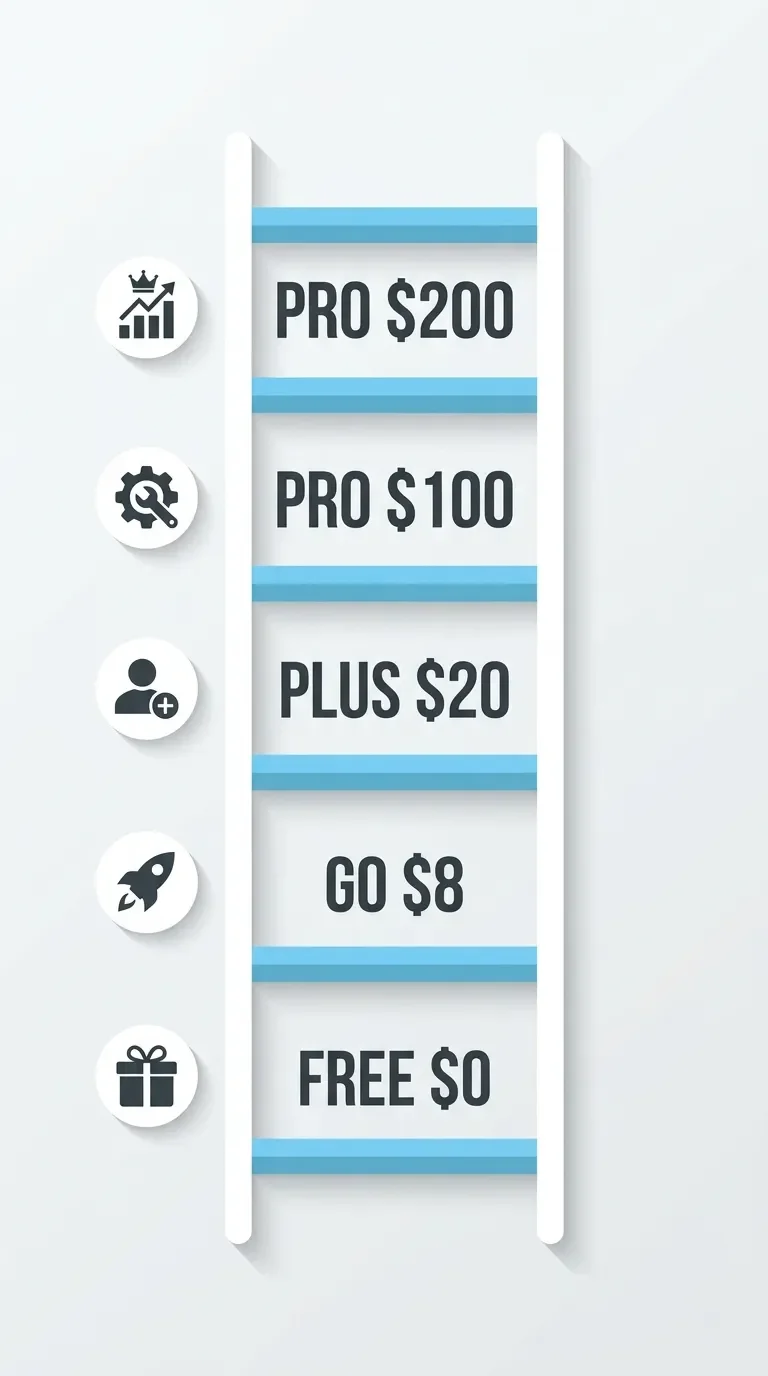
OpenAI has turned what used to be one chatbot into a five-rung ladder. The jumps between rungs aren't even – some are a few dollars, one is an $80 leap, and the top one will cost you as much as a decent monthly grocery run. Here's how they stack up, pulled together from OpenAI's own help docs.
| Plan | Price / mo | Main model | Message limit | Context window | Standout features | Best for |
|---|---|---|---|---|---|---|
| Free | $0 | GPT-5.5 Instant | 10 every 5 hrs | Small | Ads in the US; drops to a mini-model at the cap | Trying it out |
| Go | $8 | GPT-5.5 Instant | 160 every 3 hrs | 54K tokens (Instant) | ~10x Free's volume; US ads; limited GPT-5.5 Thinking; no Deep Research | Casual daily use |
| Plus | $20 | GPT-5.5 Thinking | 160 every 3 hrs | 256K tokens (Thinking) | Deep Research (10/mo), Codex, Images 2.0, ad-free | Most professionals |
| Pro ($100) | $100 | GPT-5.5 Pro | 5x Plus | 256K tokens | Heavier reasoning, Light/Heavy compute toggles | Power users hitting Plus caps |
| Pro ($200) | $200 | GPT-5.5 Pro | 20x Plus | 400K tokens | 250 Deep Research runs, top-tier compute ceiling | Developers, heavy analysts |
A couple of things jump out before we go deeper. The $20 Plus tier is where the actually-smart model really becomes the default – the tiers below it lean on the fast, shallow Instant model, with Go getting only a rationed taste of Thinking. And there's no annual discount anywhere on the consumer plans, which still annoys me a little. Perplexity and Google will happily knock money off for a yearly commitment. OpenAI just won't. You pay full freight every month or you walk.
One note for readers outside the US, since I'm writing from Germany: those "ads in the US" lines are exactly that – US-only. On this side of the Atlantic, Free and Go don't currently serve ads (for now!), so the gap between Free and Plus feels a little smaller here than it does for an American reader. Keep that in mind when you weigh the upgrade.
How ChatGPT's Tiers Actually Work in 2026
If you want to understand why these tiers are priced the way they are, you have to understand what changed under the hood this year. Skip this section if you just want the verdict – but if you've ever wondered why Plus feels smarter than Go or Free for the exact same kind of question, this is the why.
In the first half of 2026, OpenAI quietly stopped being "a chatbot" and became a tiered, multi-agent operating system. The pivot point was the GPT-5.5 model family, which split the engine into three variants: GPT-5.5 Instant, GPT-5.5 Thinking, and GPT-5.5 Pro. Free and Go mostly ride on Instant. Plus gets Thinking. Pro gets Pro. That's the whole hierarchy in one sentence.
Test-Time Compute
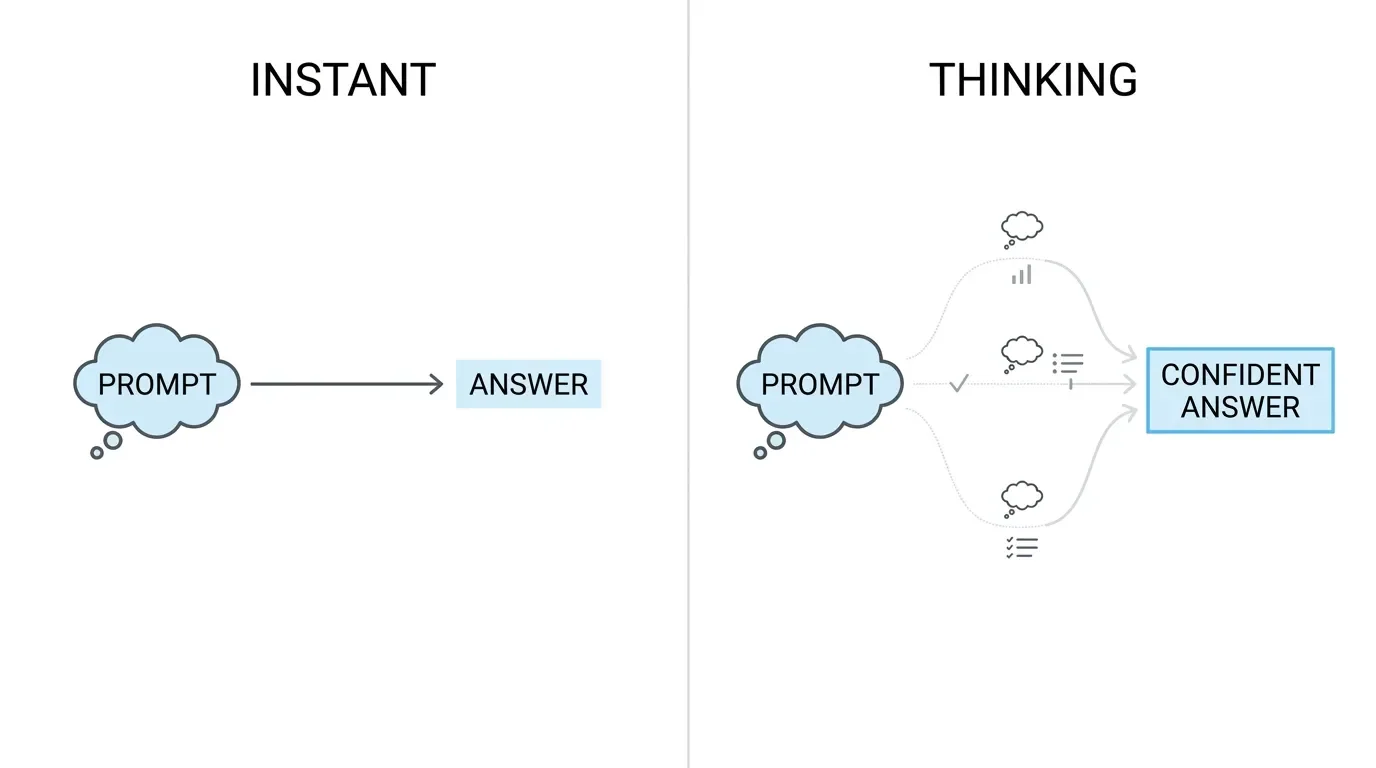
The real difference between them is a concept called test-time compute, and it's worth understanding because it's the thing you're actually paying for. Instant is built for speed – it fires back the first plausible answer with almost no latency. Thinking does something different: it deliberately spends extra processing cycles generating hidden reasoning before it answers, evaluating a few different paths and self-correcting before it commits. The analogy I keep coming back to is the difference between a colleague who blurts out a guess the second you finish your question, and one who pauses, actually thinks, and then gives you something you can use. For a quick factual lookup, the guesser is fine. For anything with moving parts – code, math, a tangled logic problem – the one who thinks wins every time.
Agents
The second structural shift is agents. OpenAI folded what used to be standalone tools – the Codex coding assistant, the Deep Research engine, the image generator – directly into the main interface. Deep Research is the one I lean on most, so it's worth explaining properly. It isn't a chat. When you trigger it, the model writes itself a multi-step research plan, runs parallel searches across the web (or domains you specify), reads any files you've uploaded, and hands back a structured report with inline citations. It's genuinely useful, and it's also genuinely expensive on OpenAI's side, which is why it's rationed so hard: Plus gets 10 runs a month, the $200 Pro tier gets 250.
That rationing is the thread that ties the whole pricing structure together. Every tier above Free is really just a different allocation of compute. You're not buying "features" so much as renting a bigger slice of OpenAI's hardware. Once you see it that way, the rest of the lineup makes a lot more sense – including why the jump to Pro costs what a small car payment does.
What You Actually Get with ChatGPT Plus
Forget the marketing page for a second. Here's what $20 actually buys you in day-to-day use, ranked roughly by how much I'd miss each one if it disappeared.
The GPT-5.5 Thinking Model
This is the real reason to pay, and I covered the why above. In practice, it's the difference between an assistant I have to double-check constantly and one I can hand a genuinely hard problem. It's not perfect by any means – more on its flaws later – but it's a different class of tool than the Instant model on Free. If you want to actually wring your $20 out of the Thinking model rather than treat it like a search box, Ethan Mollick's Co-Intelligence is the one book I'd point you to on working with these tools instead of just poking at them.
A 256K-Token Context Window (on the Thinking model)
Big enough to drop in a long research dossier, a messy hour-long transcript, or several thousand words of draft and have the model hold the whole thing in its head at once. When you manually pick GPT-5.5 Thinking, Plus actually gets a 256K-token window – 128K for what you feed in, plus another 128K for the model's output – while the default Instant model is a much tighter 32K. For my blog’s research work this is the feature I'd fight hardest to keep. When I'm researching a topic and work with a 5,000-word dossier, I need the model to remember the introduction by the time it reaches the conclusion. On a smaller window, it forgets, and the output gets repetitive and disjointed.
Deep Research, 10 Runs a Month
I treat that cap like a monthly budget, because it is one. I don't spend a run on something a normal search could answer in thirty seconds. I save them for the jobs where I'd otherwise open fifteen browser tabs and lose an afternoon – competitor breakdowns, gathering primary sources for a post, that kind of thing. Used well, one run can replace a half-day of manual digging. Used lazily, you'll burn all ten by the 8th and spend the rest of the month resenting the limit.
ChatGPT Images 2.0(and, Until Recently, Sora Video)
OpenAI has now discontinued Sora, and the in-ChatGPT video generator went with it – so the 720p, 5-second clips Plus used to bundle are gone. What's left on this front is the "Thinking Mode" image generator, and it's genuinely handy for a quick thumbnail concept or a throwaway visual. I won't pretend to mourn the video side too hard: as someone who edits in DaVinci Resolve, a 5-second 720p clip was never going to replace my timeline, and as a pianist I'll add that I hate lazily created AI slop. But its sudden removal is a sharp little lesson in how fast OpenAI yanks features – a Plus selling point one month can be a dead link the next.
Codex Access
At the standard level, for the coding crowd, plus a clean, ad-free interface. That last part matters more for US readers than for me in the EU, but it's still part of the package.
My honest summary: Plus is a generalist's tool. It does a lot of things well and nothing perfectly, and for most people that breadth is exactly the point.
ChatGPT Free vs Plus: What Changes When You Pay
The gap between Free and Plus is wider than the $20 makes it sound. Three things change the moment you upgrade.
1. Higher Message Limits
Free caps you at 10 messages every 5 hours on GPT-5.5 Instant, and when you hit it, the session quietly drops to a smaller mini-model or just tells you to come back later. Plus gives you 160 messages every 3 hours. That sounds abstract until it happens to you mid-task. I hit the Free wall once while researching a post, right in the middle of a train of thought, and had to sit there waiting for a timer like I'd been put in detention. That was the afternoon I stopped pretending Free was enough for real work (at least for my use cases).
2. The Model Changes
Free runs on Instant, the fast shallow model. Plus runs on GPT-5.5 Thinking. For "what year did X happen," you won't notice the difference. For "read this draft and tell me where the argument falls apart," you absolutely will. The Free model gives you a confident, generic answer. The Plus model gives you something that engages with what you actually wrote.
3. The Ads Go Away
If you're in the US. OpenAI now injects contextual ads into both Free and Go for American users. Plus is clean across the board. For my US readers, that alone nudges the math. For the rest of us, it's a non-factor today, though I'd bet money it spreads to other regions eventually.
None of these three justify $20 on their own. Stacked together, for someone using the tool seriously, they do.
Is ChatGPT Go Worth It?
Go is the strangest member of the family, and I've gone back and forth on it more than any other tier.
For $8 a month it hands you roughly ten times the Free tier's message volume and a 54K context window. But – and this is the catch that defines the whole tier – it still runs on GPT-5.5 Instant by default, still shows US ads, and gives you only a heavily rationed taste of the smarter GPT-5.5 Thinking model: roughly 10 messages every 5 hours, tucked away behind the tools menu, with Deep Research off the table entirely. ChatGPT's auto-router will occasionally bump a genuinely hard question up to Thinking on its own, but you can't actually lean on it. So you're mostly paying to remove a limit, not to unlock a smarter assistant – you're buying more of the cheap model, not real access to the better one.
I think one Reddit user summed it up better than I could: Go is for people who "use ChatGPT pretty regularly but you're not living in it all day." That's exactly the niche. If you draft the occasional email, ask a handful of questions, and mostly just want the Free tier to stop nagging you about limits, $8 is fair and honest.
Here's where I'd push back, though. If what you actually want is AI that's cleverer – better reasoning, better writing, the ability to chew through a long document – Go is a trap. You'll feel the missing intelligence inside a week (due to the Thinking model limits), get frustrated that the answers are no better than Free, and end up upgrading to Plus anyway. At which point you've spent $8 to learn a lesson you could've read here for free. My psychology-student instinct says OpenAI knows this perfectly well: Go is priced and positioned as a stepping stone that's just uncomfortable enough to nudge you up to $20.
So: Go is worth it for the genuinely-casual-but-slightly-frequent user, and a waste for anyone chasing capability. Be honest with yourself about which one you are.
Is ChatGPT Pro Worth It?
This is where the price tag stops being casual. Pro splits into two: $100 and $200 a month.
The $100 tier gives you GPT-5.5 Pro – OpenAI's heaviest consumer reasoning model – five times the Plus usage limits, and compute toggles that let you spend more thinking-time on dense problems. The $200 tier is the serious one – 20x Plus limits, a 400K-token context window (OpenAI's biggest – enough to swallow a long codebase or a stack of novels in one go), 250 Deep Research runs a month, and the highest compute and message ceilings OpenAI sells.
(One small note if you're cross-shopping pricing blogs: plenty still list "o1 Pro" or "o3-pro" on these tiers, but both are gone. OpenAI folded o3-pro into GPT-5 Pro back at the GPT-5 launch, and it's GPT-5.5 Pro doing the heavy reasoning now as of writing – even plain o3 is mid-sunset, retiring from ChatGPT on August 26, 2026. Those dead model names just linger in SEO articles long after they're gone.)
Here's my take after spending real time on it: Pro is a developer's tool wearing a consumer price tag. The people getting their money's worth aren't chatting – they're running Codex against complex software projects and hammering Deep Research for market analysis. As a conversational assistant, Pro felt almost identical to Plus. The value only showed up in workloads I don't run.
If you're not doing parallel agentic work, or constantly slamming into the Plus caps, the leap from $20 to $100 is a 400% price increase for headroom you'll never touch. And the churn data backs this up. Why not spread the saved money from not buying Pro across Claude Pro and Gemini Pro instead – three $20 subscriptions for $60 a month, under a third of what the $200 Pro tier costs. That math is brutal and hard to argue with. Why pay $200 for one company's best model when $60 buys you the best of three?
There's also a quieter point worth making. I feel like the $200 tier could be considered a warning sign for the whole industry: If frontier LLMs do not get democratized, we will end up paying something closer to rent than a subscription to a handful of providers.. I don't think we're there yet. But the jump from $20 SaaS tools to $200 compute allocations is a real shift in how this stuff is priced, and it's worth being a little uncomfortable about.
My verdict on Pro: unless you have a specific, heavy, daily, ideally professional reason for it, Plus plus a competitor subscription is the smarter spend almost every time.
ChatGPT Plus vs the Competition: Claude, Gemini & Perplexity
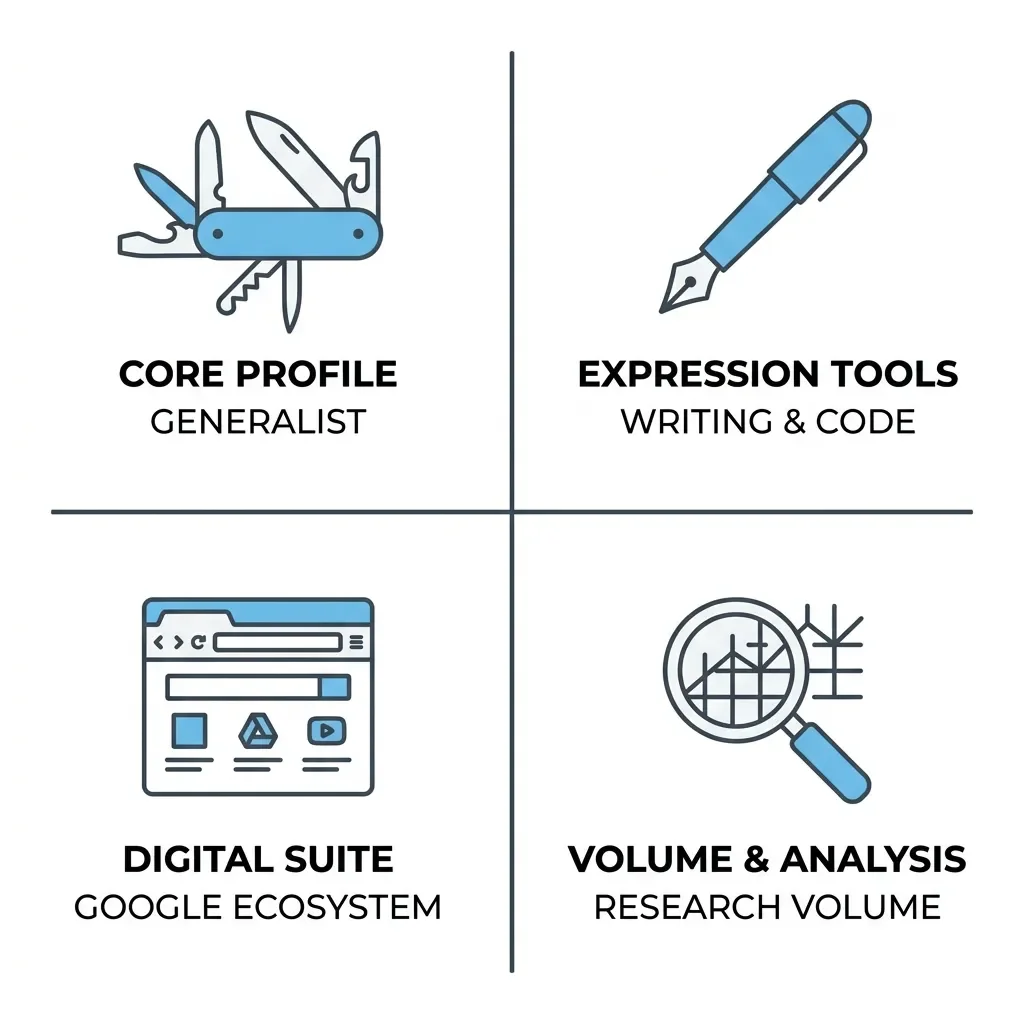
Here's the thing nobody at OpenAI wants front-and-center: at $20 a month, ChatGPT Plus has direct competition that is, in places, simply better. The flagship tiers have all converged on the exact same price, which means the decision isn't about cost anymore. It's about fit. So let me lay out where each one wins, because picking the right $20 matters more than picking a $20.
ChatGPT Plus
ChatGPT Plus wins on breadth. It's the Swiss Army knife. Text, code, image generation, and an autonomous research agent, all in one subscription. If you want one tool that does a competent job at everything and you don't want to think about which app to open, this is it. That generalist strength is genuinely valuable – but it's also why specialists can beat it.
Claude Pro
Claude Pro (also $20) is the one I'd hand to writers and coders without hesitation. The developer community widely rates Claude's prose as more fluid and more human. Claude's Sonnet and Opus models tend to produce copy that needs less de-robotizing afterward. On the engineering side, Anthropic's dedicated "Claude Code" command-line tool goes toe-to-toe with Codex. There's even a cost angle: going by Anthropic's published API rates – Sonnet 4.6 at $3 per million input tokens, Opus 4.6 at $5 – the flat $20 subscription works out cheaper than pay-as-you-go billing for all but true power users. For pure writing, you should reach for Claude.
Gemini Pro
Google's Gemini AI Pro ($19.99) wins on two fronts: context and ecosystem. It offers a 1-million-token context window – far beyond what Plus exposes – plus Veo video generation and deep integration into Gmail, Google Docs, and NotebookLM. If you live inside Google's tools all day, the lock-in works in your favor for once. The assistant is right there in the apps you're already using. It is also my overall personal favorite for day-to-day tasks.
Perplexity Pro
Perplexity Pro ($20) still wins on research volume, though by less than it used to. In early 2026 Perplexity quietly trimmed Pro's Deep Research allowance to around 20 runs a month – a downgrade that landed with no real announcement and irritated a lot of long-time subscribers. Even after the cut, that's still roughly double ChatGPT Plus's ten a month, and Perplexity layers on effectively unlimited everyday Pro searches on top. So if you're an academic, an analyst, or a blogger who runs research constantly, it's still the more generous research-first tool – just not the bottomless well it was a year ago. I lean on it alongside ChatGPT's Deep Research every week for researching topics.
So where does that leave Plus? Honestly, as the best default and rarely the best specialist. If you only get one and you do a bit of everything, Plus is the safe pick. But if you know your main use case – writing, research, or living in Google – there's a strong argument that your $20 belongs elsewhere. The smartest move I've seen plenty of people make is to keep Plus as the generalist and add one specialist tool on top, rather than paying $200 for a single company to try to be all of them.
Is ChatGPT Plus Worth It for Students?
Short answer: it's the same $20 as everyone else, and that stings.
The much-loved promotion that gave US and Canadian students two free months of Plus expired back in May 2025 and never came back. Despite petitions and forum campaigns begging for a standing $10 student tier, OpenAI hasn't budged. The only current concession is an experimental referral program limited to a handful of universities in Australia and Colombia – one free month if your institution happens to be on the approved list. For everyone else, students pay full price.
I spent the better part of a decade as a student myself – six years of law, a few more in psychology – before health forced me off that path, so I have real sympathy for anyone trying to stretch a student budget around another $20 subscription. And here the behavioral angle bothers me. Students are exactly the group most likely to get genuine value out of a strong reasoning model, and exactly the group least able to absorb the cost. The lack of a real student tier has, predictably, pushed a lot of them toward grey-market aggregators (more on those below) just to afford access at all.
My honest advice if you're a student: don't subscribe year-round. Start on the Free tier, and step up to Go or Plus only during the weeks you're actually buried in coursework or finals. There's no lock-in and no annual contract, so you can cancel and re-subscribe month to month. Pay for the crunch, not the quiet weeks. And if you're in the US, weigh Claude Pro or Gemini against Plus too – for essay-writing and research, they're at least as compelling for the same money.
Some Catches: Throttling, Privacy & Vendor Lock-In
I'd be doing you a disservice if I sold you Plus without the warnings. There are three real ones, and they're the kind of thing the marketing page will never mention, or will only mention poorly.
1. The Message Limits Are Dynamic, Not Fixed
OpenAI officially says Plus gets roughly 160 messages every 3 hours. What it doesn't advertise is that this limit flexes with server load. During peak global traffic, the system will throttle Plus users – quietly downgrading you to a weaker mini-model, or locking you out until a cooldown resets. So the $20 doesn't buy you guaranteed compute; it buys you priority, which is a different thing. For casual use you'll never notice. But if you're racing a deadline during a busy window and the model suddenly gets dumber, now you know why. Even on the Plus plan, the model can still throw overconfident answers and miss nuance unless you guide it carefully – and that gets worse, not better, when you've been silently downgraded.
2. Your Data Trains the Model by Default
This is the one I'd actually nag you about. On Free, Go, Plus, and Pro, your conversations, file uploads, and generated images are used to train OpenAI's future models unless you turn it off. The toggle is buried in Settings → Data Controls, labeled "Improve the model for everyone." Switch it off. As a freelancer who handles client documents and a former law student who reads the fine print out of reflex, this is the very first thing I change on any new account. If you're pasting in anything sensitive – client work, unpublished writing, anything under an NDA – do it before your next prompt, not after. Only the Business and Enterprise tiers exclude your data by default.
3. Vendor Lock-In Is a Genuine Risk
OpenAI has shown it'll sunset major products with brutal speed. The standalone Sora apps were shut down on April 26, 2026; the Sora API gets cut off entirely on September 24, 2026. The Canvas feature was pulled in late May. Legacy models like GPT-4.5 and o3 have hard retirement dates on the calendar. The Futurum Group called this the "innovation tax" – build your workflow tightly around one proprietary feature and you're one product decision away from having to rebuild it. I keep my own systems as model-agnostic as I reasonably can for exactly this reason. Lean on Plus, sure, but don't wire your entire livelihood to a single feature that OpenAI could delete in a patch note.
Hidden Costs: API Billing, Aggregators & Subscription Fatigue
The sticker price isn't the whole bill, and I think a pillar post owes you the full picture.
1. A Subscription Is Not API Access
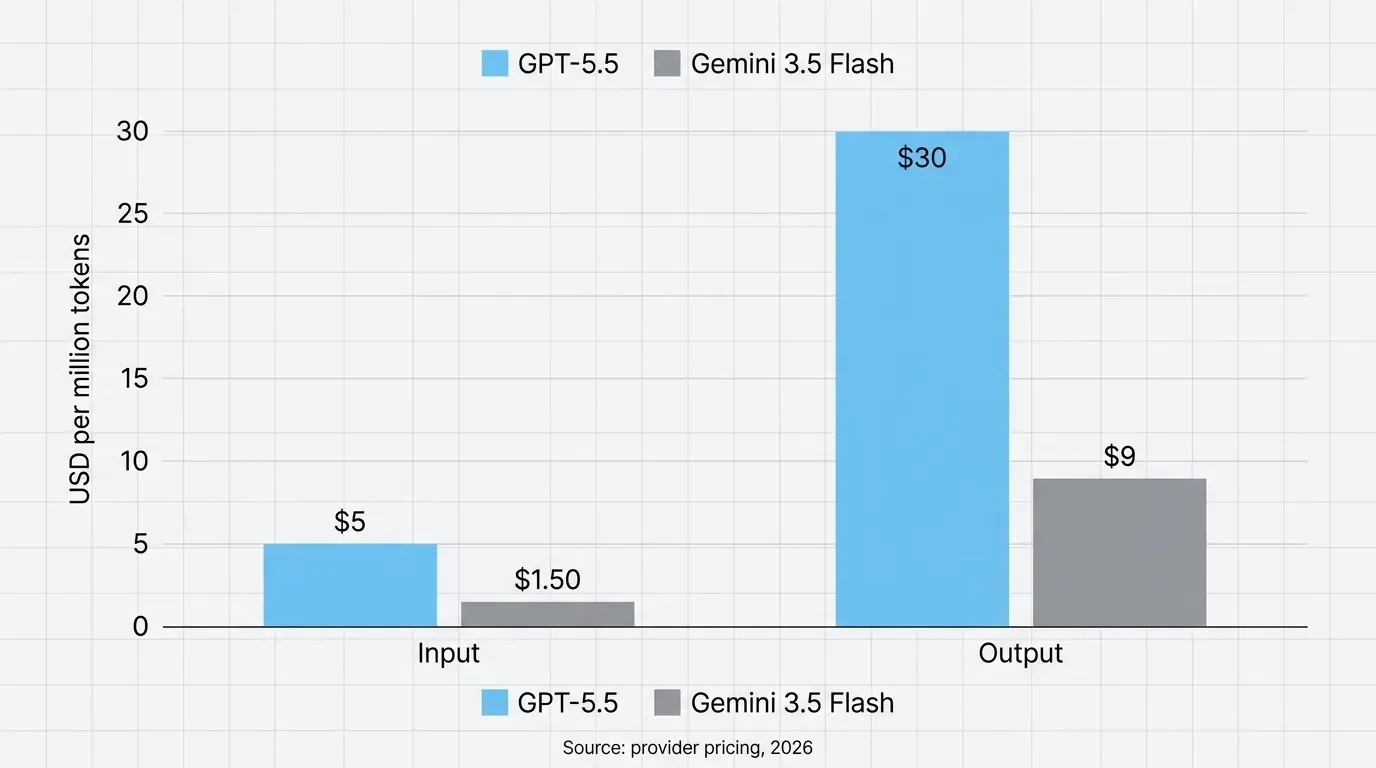
This trips people up constantly. Paying for Plus, Pro, or even Business gets you exactly zero API credits. If you want to build something programmatic – automate a workflow, wire ChatGPT into your own app – that's a completely separate, pay-as-you-go account billed by the token. And those tokens aren't cheap: GPT-5.5 runs about $5 per million input tokens and $30 per million output tokens. For comparison, Google's newly released Gemini 3.5 Flash – its fast, speed-focused tier, launched in May 2026 – runs $1.50 input and $9 output. So if you're doing high-volume processing, OpenAI's frontier model is a serious line item, and a Flash-class competitor still lands at roughly a third of the cost. Worth knowing before you architect anything around it.
2. Subscription Fatigue Is Real, and It's Spawning a Grey Market
Stacking ChatGPT Plus, Claude Pro, and Gemini Advanced individually runs you around $60 a month. Predictably, third-party "aggregators" – names like Krater, GlobalGPT, and Blackbox – have popped up promising access to all the big models through one dashboard for $5 to $15 a month, using pooled API keys. The pitch is seductive: every frontier model, a fraction of the price. I'd tell you to be careful here, and not just out of caution. These services operate in a legal grey area against the vendors' terms of service, OpenAI could ban-wave the accounts behind them at any time, and you're routing your prompts through a middleman you don't control. For a budget-constrained student kicking the tires, maybe. For anything involving real or sensitive work, I wouldn't touch them. Cheap access you can't rely on isn't a bargain.
3. This Is More of an Observation than a Warning:
The whole market has quietly shifted from "a $20 software subscription" to "a compute allocation," and the $200 Pro tier is the clearest sign of it. My psychology background makes me watch how people rationalize these costs, and the pattern is familiar – we anchor to the $20 number, then slowly accept that "serious" use costs 10 times that. Push back on that instinct. For the overwhelming majority of people, including me, $20 of well-chosen subscription buys more than enough intelligence.
How to Upgrade, Downgrade, or Cancel ChatGPT Plus
A quick practical note, and one that trips people up far more than it should. I lose count of how often I see someone genuinely upset that they can't cancel a subscription from inside an app. The same logic bites ChatGPT users, so let me save you the headache.
To upgrade:
Go to chatgpt.com in a browser – not the mobile app. The top Pro tiers often won't even appear on iOS or Android because of App Store revenue-sharing rules.
Open the profile menu and choose Upgrade your plan.
If the tier you want doesn't show up in the pop-up, go to Settings → My Plan to force the full menu open.
Add payment, and the new limits and models kick in immediately.
To cancel or downgrade:
On the web: profile icon → Settings → Billing → Cancel. There's no proration – you keep access until the end of the billing cycle, so cancel whenever and use up what you've paid for.
Apple: if you subscribed through the iPhone App Store, that Billing tab won't let you cancel at all. You have to go to iPhone Settings → your name → Subscriptions → ChatGPT → Cancel Subscription. This is the single most common confusion I see in person. Check where you signed up before you go hunting for the off switch.
And while you're in there for the first time, do two more things: flip off that data-training toggle in Data Controls, and if you use Deep Research, point it at trusted domains via the "Manage sites" option so the agent isn't pulling from whatever it finds. Two minutes of setup that pays off every session after.
My Verdict: Who Should Pay – and Who Shouldn't
So, after all of that, here's where I land – the single honest recommendation, sorted by who you actually are.
If you take one idea from this whole post, make it this: ChatGPT Plus is the right default for most daily users, but it should never be an automatic yes. I pay for it myself, and I'd pay for it again tomorrow, because the GPT-5.5 Thinking model and its 256K context window genuinely changed how I research and draft. I don't pay for Pro, because I'd be renting horsepower I never use. That's not a knock on Pro – it's just not built for me, and it's probably not built for you either.
Here's my breakdown by user type:
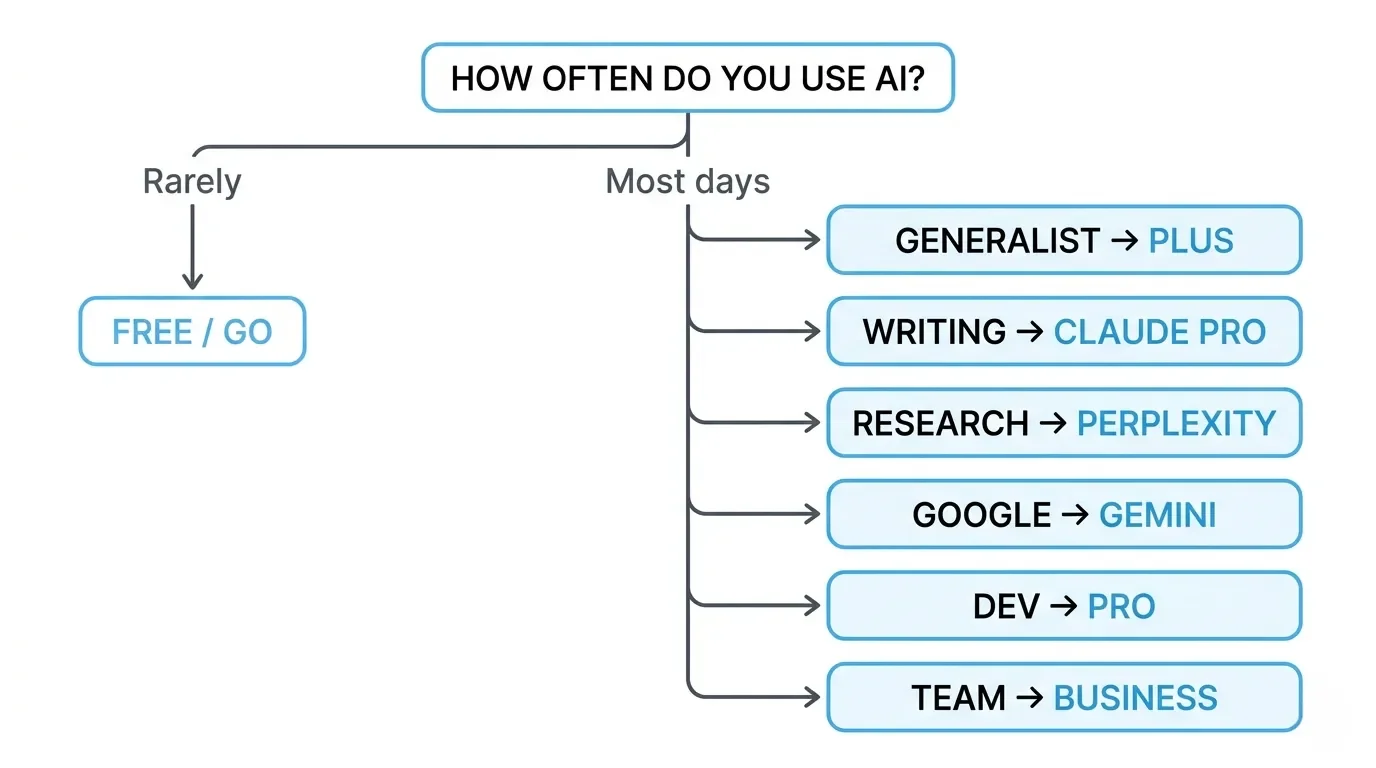
Casual user, a few prompts a week → Stay on Free. Step up to Go at $8 only if the message limits genuinely get in your way. Don't pay for intelligence you won't lean on.
Daily generalist – writing, research, brainstorming, light coding → Plus. This is the default, it's the one I pay for, and for most people reading this, it's the answer.
Serious writer or copywriter → Try Claude Pro at the same $20 before you commit to Plus. Its prose needs less cleanup, and that adds up fast.
Heavy researcher or analyst → Perplexity Pro. Its Deep Research cap got trimmed to roughly 20 a month in early 2026, but that's still about double Plus's ten – plus effectively unlimited everyday Pro searches on top.
Google-ecosystem user → Gemini AI Pro, for the 1-million-token context and the integrations into tools you already live in.
Developer running agentic or Codex-heavy workloads → Pro ($100 or $200). This is genuinely who those tiers exist for, and if that's you, you already know it.
A team of two or more → Business. After the April 2026 price cut it's $20 per seat (billed annually) – the same as individual Plus – but you get SSO, SOC 2 Type II compliance, and, most importantly, your data is excluded from training by default. Five Plus seats and five Business seats both cost $100 a month. Only one of them protects your client work. For any small team, that's not really a decision.
And the move I'd quietly recommend to a lot of people: don't try to make one subscription do everything. Keep Plus as your generalist, add one specialist tool if your main use case calls for it, and you'll get more for $40 than you ever will for $200.
So before you hand over the money, ask yourself one honest question – do you actually open this thing most days? If yes, Plus earns its keep many times over. If you mostly write, go give Claude a real shot. If you live in research, Perplexity gives you more room to breathe. If you're a team, Business does the same job for the same money while keeping your data out of the training set. Pick the tier that fits how you really work, not the one the upgrade button pushes hardest. And whatever you land on, go turn off that training toggle first.
Before you go, I want your math. Which rung are you actually on, and have you ever talked yourself up a tier only to quietly downgrade a month later? Tell me what earned its keep and what just stung in the comments below.
And if you'd rather not gamble $20 a month on guesswork, join the newsletter. Every time one of these tools shifts its pricing, models, or limits, I send a plain-English breakdown so you can re-check your tier before OpenAI quietly moves the goalposts again.






FAQ
-
Yes, but the timing isn't symmetrical. Upgrades (say, Plus to Pro) kick in immediately and you pay the difference, while downgrades and cancellations only take effect at the end of your current cycle – there's no proration, as I covered in the upgrade-and-cancel section. So if you want to test a higher tier, do it early in your month and you'll squeeze the most out of what you've already paid for.
-
The headline price is the same roughly $20, billed in your local currency plus any VAT, but a couple of things genuinely differ. The contextual ads OpenAI runs on Free and Go are US-only for now, so here in Germany the Free tier feels a little less restrictive than it does for an American reader. Everything else – the models, the message limits, the Deep Research caps – is identical region to region.
-
For almost anyone using ChatGPT through the normal chat interface, no. The API is billed separately at roughly $5 per million input tokens and $30 per million output for GPT-5.5, and it hands you raw model access with none of the app, memory, or Deep Research wrapped around it. The flat $20 only looks expensive if your usage is tiny – and at that point the Free tier probably covers you anyway.
-
You don't lose your account or your history. At the end of the billing cycle you simply drop back to Free-tier limits and the GPT-5.5 Instant model, while your past conversations, custom instructions, and saved memory stay intact. That's exactly why I tell students to subscribe only during crunch weeks and cancel in between – re-subscribing later picks up right where you left off.
-
You can technically log in on multiple devices, but a single Plus seat is built for one person, and heavy simultaneous use will trip the dynamic rate limits I described earlier. For genuine multi-person use, Business is the intended route, though it carries a two-seat minimum, so a true solo user can't buy into it. Sharing one login to dodge that is a fast way to get throttled.
-
No, and you likely can't get it anyway, since Business requires at least two seats. The privacy gap people worry about – your chats training the model – is fixable on a normal Plus account by switching off "Improve the model for everyone" in Data Controls. Business adds default data exclusion and SOC 2 compliance on top, which matter for teams under contractual obligations, but a solo freelancer who flips that one toggle is most of the way there.
-
Yes, and this catches people out. Even though Plus runs on GPT-5.5 Thinking, OpenAI throttles dynamically under heavy server load, quietly routing you to a weaker mini-model or making you wait out a cooldown. As I noted above, your $20 buys priority, not a guaranteed slice of compute, so the smartest model isn't always the one answering you during peak hours.






I've used Gemini image generation almost daily for months. Here's how to create and edit images, what the free limits really are, and my best prompts.