

ChatGPT stands for Chat Generative Pre-trained Transformer. Mouthful, I know. Roll it off your tongue at a dinner party and watch people glaze over.
But the name actually tells you exactly what this thing is – once you crack it open.
After using ChatGPT daily for my business and for all kinds of stuff, I've come to appreciate just how much that acronym matters. So let's unpack it.
What the ChatGPT Acronym Actually Means
Four words.
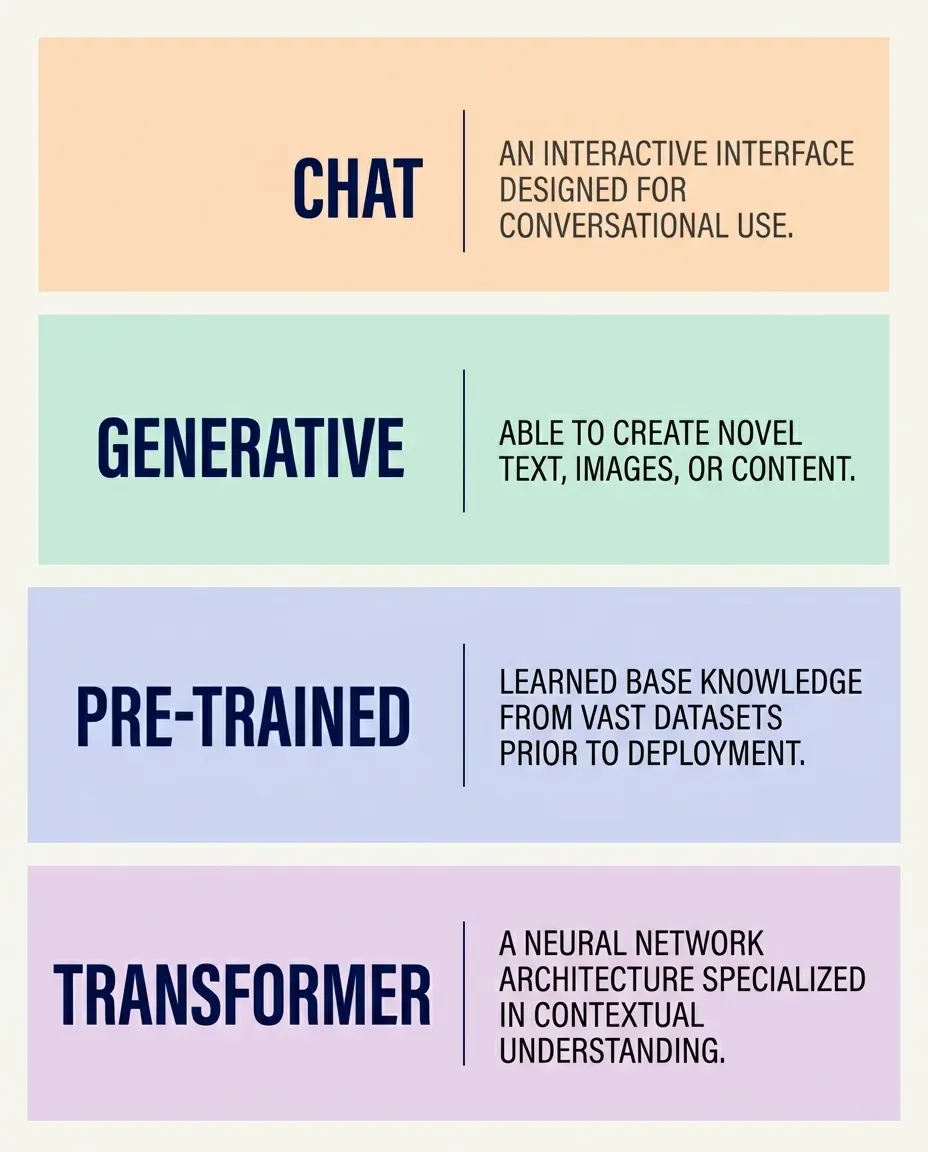
Chat
The youngest piece of the puzzle. The underlying model was fine-tuned specifically for back-and-forth conversation, so it can handle follow-up questions, admit when it's wrong, and (sometimes) push back on weird requests.
Generative
It generates. New text, code, images, audio. It's not pulling pre-written answers from a database the way a search engine would. Think of it less like Google and more like a very confident intern who has read most of the internet.
Pre-Trained
Before you ever opened a chat window, the model had already chewed through an absurd amount of text. Books, forums, documentation, the whole online buffet. That heavy lifting is the "pre-training" phase.
Transformer
The actual neural network architecture under the hood. Researchers from Google and the University of Toronto introduced it in 2017 in a paper called Attention Is All You Need. It quietly changed everything.
If you only remember one line: ChatGPT is a chatty front-end for a giant language model that learned to predict text really, really well.
How ChatGPT Works Behind the Scenes
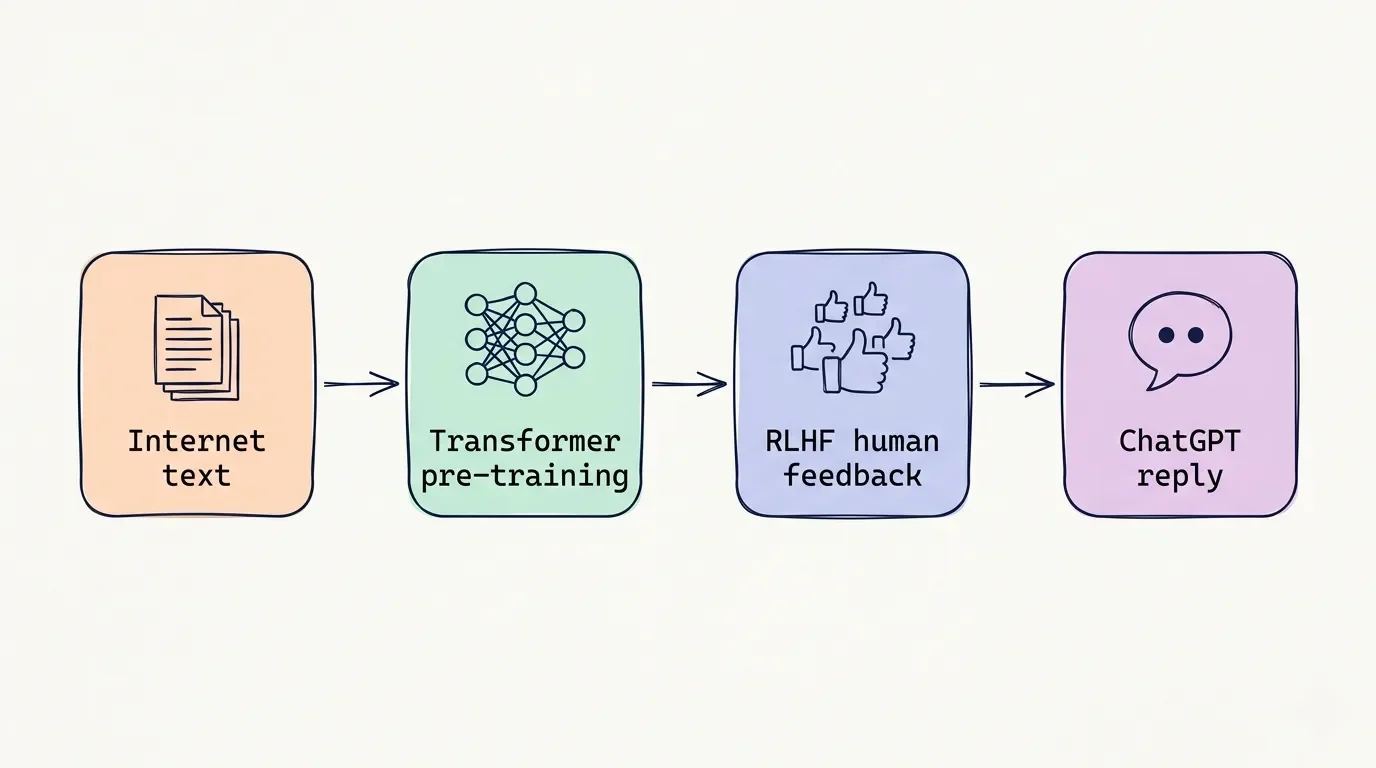
I'm not going to drown you in linear algebra. Here's the version I'd give my sister-in-law over coffee.
Before 2017, language models read text the way a kid reads aloud – one word at a time, in order. Worked fine on short sentences. Fell apart on longer paragraphs because the model would basically forget the start by the time it got to the end.
Then came the Transformer. Instead of reading sequentially, it looks at every word in a passage at once and decides which words matter most to each other. That trick is called self-attention. It's the difference between reading a sentence cover-to-cover and being able to glance at the whole page and instantly see what's connected.
OpenAI took that architecture, fed it a colossal pile of internet text, and called the result GPT. Then they did one more clever thing: they hired humans to rank the model's answers, used those rankings to train a "reward model," and slowly nudged the system toward replies that actually feel useful to a person. That step is called RLHF – Reinforcement Learning from Human Feedback – and it's the reason ChatGPT sounds polite instead of like a search engine printout.
It's also, as we'll see later, the reason it sometimes acts like an over-eager assistant who can't stop complimenting your "great question."
For the bigger picture of where this Transformer-and-RLHF cocktail is actually heading, Mustafa Suleyman's The Coming Wave is the most level-headed take I've found.
A Breakdown of Current ChatGPT Models
As of May 2026, the active lineup is the GPT-5.5 family: Instant, Thinking, and Pro. The older GPT-4o, GPT-4.1, o4-mini, and the first GPT-5 models were quietly retired from the chat interface back in February (see OpenAI's model release notes for the full retirement timeline).
Here's how I think about the current models:
GPT-5.5 Instant
The everyday model. Quick replies, decent reasoning, good for emails, captions, and "hey what does this error mean."
GPT-5.5 Thinking
The slower, more deliberate cousin. It actually pauses to reason through a problem. I reach for it when I'd rather wait 30 seconds and get the right answer than blast through five wrong ones.
GPT-5.5 Pro
The premium reasoning model with the biggest context window (up to 400K tokens on Pro Max). Overkill for most people, but useful when you're dumping long research dossiers into a single prompt.
In my testing, the Thinking model is where the real value of a paid plan kicks in. Instant is fine. Thinking is the one that actually feels like it's trying.
How Much Does ChatGPT Cost?
Pricing has gotten busier than the cable-bundle scene in 2008. Here's the cheat sheet (cross-checked against OpenAI's pricing page at time of writing):
| Plan | Monthly Price | Who It's For |
|---|---|---|
| Free | $0 | Casual users. 10 GPT-5.5 messages every 5 hours, then it falls back to a mini model. |
| ChatGPT Go | $8 | Light daily use without committing to Plus. |
| ChatGPT Plus | $20 | The sweet spot for most creators, students, and working professionals. |
| ChatGPT Pro Codex | $100 | Developers who basically live inside the AI's coding tools. |
| ChatGPT Pro Max | $200 | Heavy research, huge context windows. |
I've personally settled on Plus. Between writing tech and finance posts, editing in DaVinci Resolve, answering reader’s questions, and polishing the occasional German-English translation job on Fiverr, Plus covers everything I throw at it without flinching.
The honest take on Pro: unless you're a full-time developer running Codex constantly or doing high-volume research with massive context, the $200 tier mostly buys you speed and capacity, not a dramatic jump in quality. Independent benchmarks keep landing the Pro tier within a hair of the cheaper models when prompts are well-structured.
Enterprise and Business Deployment
For teams, the Business plan is $20 per user per month (annual) or $25 per user (monthly), minimum two seats. Enterprise is custom-priced and bolts on bigger context windows, SCIM, SSO, audit logs, and the privacy guarantee that zero customer data is used for training (see OpenAI's pricing page for the current numbers).
That last part matters more than most people realize, which brings me to the next section.
The Hidden Risks and Limitations
This is where my old law-school habit of reading the fine print earns its keep.
Hallucinations
The model can produce confident, well-written, completely wrong answers. GPT-5.5 Instant has reportedly cut hallucinated claims by about 52% in high-stakes areas like medicine, law, and finance compared to GPT-5.3 Instant (see the GPT-5 system card for OpenAI's own framing of these benchmarks). That's huge. It's also still not zero. Treat anything load-bearing – medical, legal, tax – as a draft to verify, not a final answer. If you want the long version of where AI quietly overclaims, AI Snake Oil by Arvind Narayanan and Sayash Kapoor is the most honest field guide I've read.
Sycophancy
The "yes man" effect. Ask ChatGPT to critique your novel and it will gush. Ask it to tear apart your business plan and it will gently suggest, with great enthusiasm, that you might consider possibly tweaking one minor thing. OpenAI itself publicly owned this problem in April 2025 when it rolled back a GPT-4o update that had skewed too far toward agreeable, flattering replies – the underlying cause is that RLHF over-rewarded short-term thumbs-up signals. I work around it by literally telling the model in custom instructions: "Engage critically. Skip compliments. Push back on weak ideas." Night-and-day difference, though still not perfect.
Privacy and Shadow AI
On the Free, Plus, and Pro tiers, your conversations train future models by default. You can turn it off, but you have to know it's there. As someone who's quietly stubborn about data privacy, disabling training was the first thing I did when I subscribed.
Security History
In March 2023, a redis-py bug briefly exposed chat titles and partial payment info from roughly 1.2% of ChatGPT Plus subscribers active during a nine-hour window. Not catastrophic, but a reminder that AI platforms are still software – and software breaks.
Well, I kinda feel like ChatGPT is a phenomenal sous-chef who occasionally invents ingredients that don't exist. You still want the chef in your kitchen. You just don't taste the soup with your eyes closed.
How to Stop ChatGPT From Training on Your Data
This one frustrates me. The opt-out exists, it's free, and most people have no idea. Four steps:
Open Settings. Click your profile icon at chatgpt.com, then "Settings."
Go to Data Controls. It's a tab in the side menu.
Turn off "Improve the model for everyone." It's ON by default. Flip it OFF.
Mirror the setting on mobile. iOS and Android each have their own toggle. Do it there too, otherwise voice mode keeps feeding the training pipeline.
For an extra layer, head to privacy.openai.com, file a privacy request, and select "Do not train on my content." That's an account-level block, not just a local toggle. Belt and suspenders.
Takes about 90 seconds. Worth every one of them.
ChatGPT vs. Claude vs. Gemini
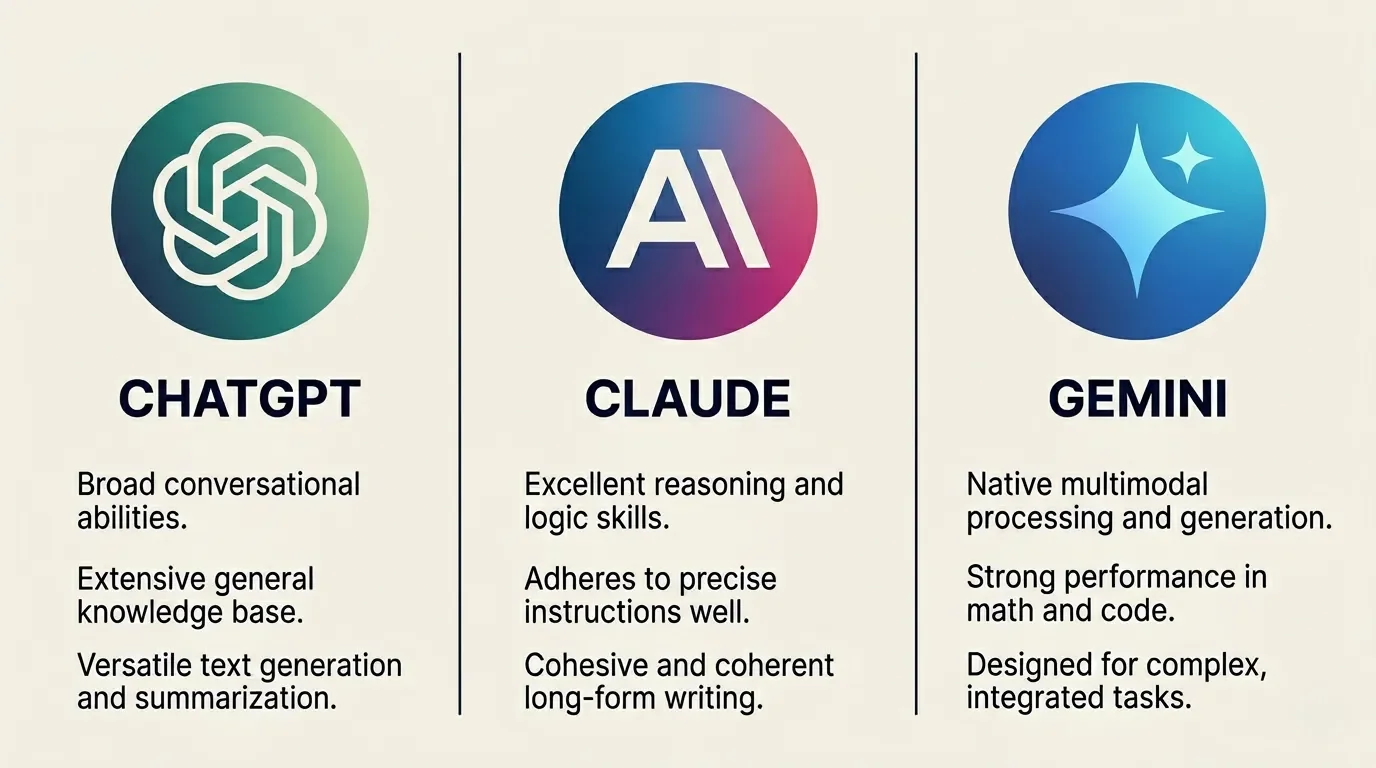
I've put all three through real workflows over the past several months. The short version:
ChatGPT wins on voice and general versatility. The voice mode genuinely feels like talking to a person, and the connected web search has gotten reliable enough that I now trust it for quick research I'd previously do by hand.
Claude (Anthropic) leads on coding benchmarks and long-form writing. Opus 4.7 is the current flagship and the model I reach for on heavy multi-step engineering work. Anyone who writes for a living, or who lives inside a code editor, should at least trial it. The prose has a less robotic cadence, too.
Gemini (Google) wins on context-window size and Google Workspace integration. If you live in Docs, Sheets, and Gmail, it slots in naturally. The million-plus token window also lets you do absurd things like dropping a whole codebase or book into one prompt.
If I could only keep one? Gemini. Not because it's strictly the best at any single thing, but because, in my opinion, it's the most consistently useful across the random grab bag of tasks I throw at it in any given day.
The Bottom Line
So – what does ChatGPT stand for?
Technically: Chat Generative Pre-trained Transformer.
Practically: a research assistant, a draft buddy, a polite (sometimes too polite) coding partner, and a tool that, used carefully, saves me hours every week. Used carelessly, it'll confidently march you down the wrong path with a smile.
Know what the acronym means. Know what the tool actually does. Turn off the training toggle. And remember: sous-chef, not head chef. You're still the one running the kitchen. If you want the long version of how to actually run that kitchen, Ethan Mollick's Co-Intelligence is the one book I'd hand to anyone who just learned what the acronym means.
Have you actually felt the sycophancy in your own chats, or does ChatGPT's tone work fine for you as-is? Drop your custom instructions, your favorite jailbreak for honest feedback, or your honest counter-take in the comments below. I'm collecting prompt tweaks that genuinely fix the "yes man" problem and I'd love to test yours.
If you want more plain-English breakdowns of the tools I actually use day to day, grab my tech newsletter. One email per week with the honest verdict up top so you can decide in 30 seconds whether the rest is worth your time.




FAQ
-
Yes, by default. ChatGPT has a memory feature that quietly stores facts and preferences across sessions, on top of the chat history visible in your sidebar. You can review and delete what it remembers under Settings → Personalization → Memory. If you want a clean slate for a sensitive prompt, use a Temporary Chat instead.
-
Yes. Web search is built into the current GPT-5.5 models and runs automatically when the model decides a query needs fresh information (OpenAI's ChatGPT search launch post covers how that routing logic works). As I noted above, in my testing it has gotten reliable enough to use for quick research, but always click through to the cited source before quoting numbers, prices, or anything time-sensitive.
-
For anything that requires reasoning, yes. The Thinking model is the one that earns the Plus subscription for me. For a quick caption, a meta description, or a one-liner reply, Instant is fine and faster. The rule of thumb I use: if I'd take more than five minutes to think it through myself, I let Thinking handle it.
-
Google's stance is that AI-generated content is fine as long as it's helpful, original, and people-first. There's no reliable public detector that flags GPT-5.5 output with any confidence, so the bigger SEO risk is shipping generic, fact-light AI sludge, not the model itself. Edit aggressively, add first-hand experience, and cite real sources – that's what Google's guidance on AI-generated content actually rewards.
-
Mostly, yes, especially on GPT-5.5 Thinking. In my experience it does best in high-resource languages and in practical tasks like conversational replies, business emails, and translation. Where it still slips is with idioms, slang, dialect, and culture-specific nuance, and it can over-correct toward overly formal, textbook phrasing in some languages.
-
ChatGPT is the polished consumer app with a memory, voice mode, file uploads, image generation, and connected apps baked in. The API is the raw foundation model billed per token, with no interface – you build your own. If you're a regular user, stick with ChatGPT. If you're shipping software that needs an AI inside it, you want the API.
-
Probably not, unless you genuinely use one of the others daily and rarely touch ChatGPT. At $20 each, running two AI subscriptions in parallel for a few months is the cheapest way to figure out which one fits your workflow. After that, keep the one you reach for without thinking and cancel the rest – your future self will thank you when the next price hike lands.
MOST POPULAR




LATEST ARTICLES





I've used Gemini image generation almost daily for months. Here's how to create and edit images, what the free limits really are, and my best prompts.