
Why Is ChatGPT So Slow? – 8 Real Reasons (and How to Fix It) in 2026

Quick version, because you probably typed this question into Google while glaring at a blinking cursor: most of the time, ChatGPT isn't slow because the AI is thinking. It's slow because your browser is drowning. The biggest culprit by far is long conversations – every message you've ever sent in that thread is still sitting in the page, quietly eating your memory until typing feels like wading through wet cement.
The fix for that specific problem takes about ten seconds: open a new chat. If your typing snaps back to life, congrats, you just diagnosed it. The rest of this article is the why, plus the fixes for every other flavor of slow – server lag, the wrong model, a junked-up browser, your network, and the question everyone eventually asks: does paying more actually help? (Short answer: sometimes, and not in the way you'd hope.)
A little context on where I'm coming from. I lean on AI for the research behind posts like this one, and the irony isn't lost on me – the research chat I used to pull this piece together started stuttering somewhere past the 12,000-word mark. I also spend a fair bit of time helping people troubleshoot computers they're convinced are dying because ChatGPT freezes the second they start typing. Nine times out of ten, the machine is perfectly healthy. The browser tab is the problem. So let's actually sort out what's going on.
Is ChatGPT Down, or Just Slow for You?
Before you blame your laptop, rule out OpenAI. Two thirty-second checks:
Is everyone affected? Glance at Downdetector's OpenAI page or the OpenAI status page. A spike in reports means it's them, not you.
Is it only one chat? Open a brand-new chat and type a sentence. If that's instant but your old monster thread still lags, the servers are fine – your browser is the bottleneck.
If responses are universally crawling across fresh chats, new devices, and a different network, then it's a server-side or connection issue, and OpenAI's own troubleshooting guide is the right starting point. If it's just that one sprawling conversation, keep reading, because that's the most common and most misunderstood cause.
The Real Reasons ChatGPT Is Slow
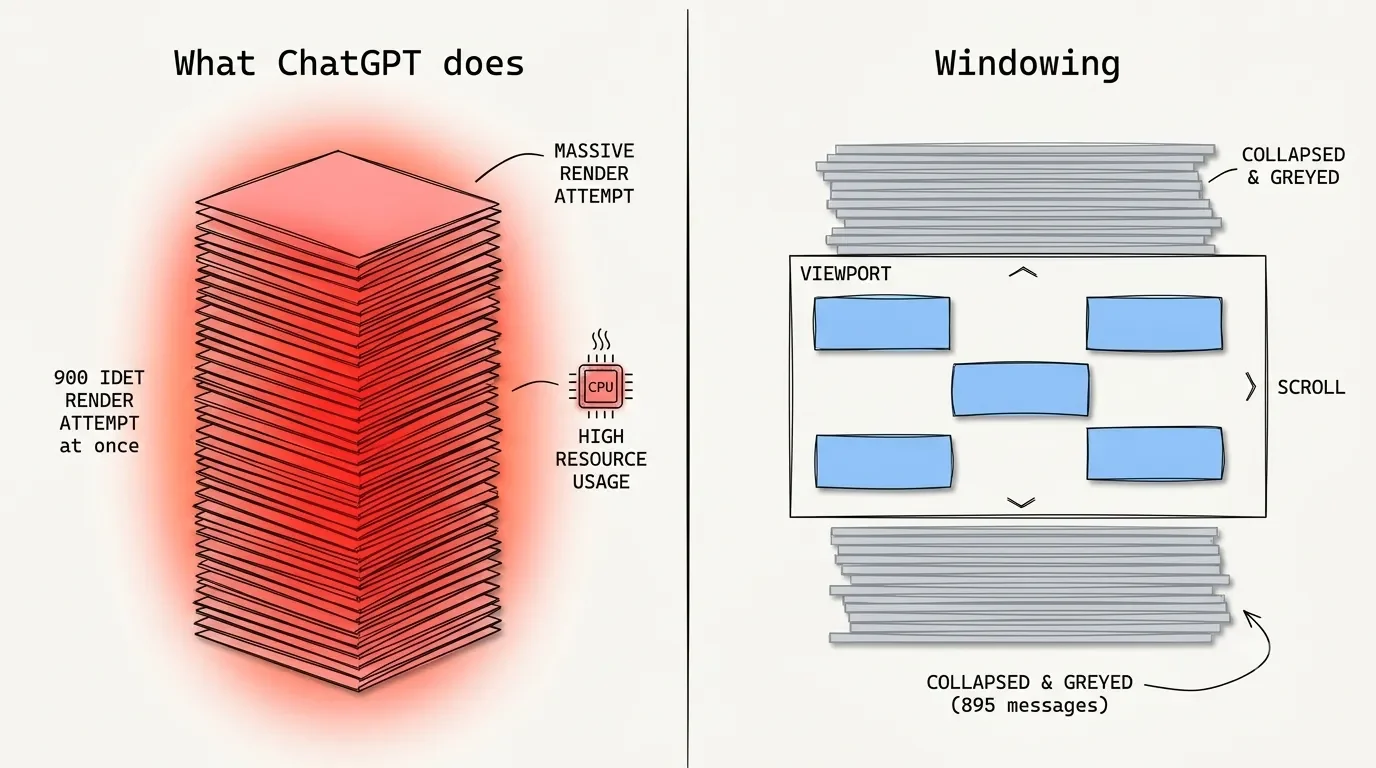
1. Long Conversations Choke Your Browser (This Is the Big One)
Here's the part nobody at OpenAI puts in a press release. The ChatGPT web app is a single-page React app, and it renders every message in your conversation into the page at once. There's a standard fix for this in web development called virtualized rendering, or "windowing" – the app only draws the handful of messages actually on your screen and quietly drops the rest until you scroll back. ChatGPT's interface doesn't do that.
I like to think of it like cooking from a recipe book where, instead of flipping to the page you need, you're forced to keep all 900 pages fanned out on the counter at the same time. By the time a chat hits 20,000 or 50,000 words, your browser is juggling thousands of live elements, and every keystroke forces it to recalculate the entire pile. The result is that maddening delay where you type a sentence and watch it appear half a second later, letter by letter.
And it's not just what you can see. Developers digging into this found the freeze is mostly the JavaScript work piling up on the browser's main thread – the housekeeping React does on every update – not the visible text itself. That's why a beefy machine doesn't save you. My video-editing desktop chews through DaVinci Resolve timelines without complaint, and a single overgrown ChatGPT tab still brought it to its knees. The hardware was never the issue.
I'm not the only one losing patience with this. As one fed-up Plus user put it on Reddit: "It's like they're purposely throttling Plus so we all get annoyed enough to fork over $200 a month for Pro." Blunt, but I get his point.
2. High Server Load and Peak Hours
Sometimes it really is them. ChatGPT serves an absurd number of requests every second, and when a new model drops or a workday peaks across the US and Europe at once, your prompt lands in a queue. Generation time can jump from a couple of seconds to thirty or more. There's not much to do here except wait it out or switch to a quieter time, but it's worth knowing this is usually temporary, not a permanent regression.
There's a quieter debate buried in here, too. OpenAI chalks peak-hour slowness up to general congestion, but exactly how requests get routed between Free, Plus, and Pro users during a surge is genuinely murky, and plenty of paying users are convinced the higher tiers get bumped to the front of the line when the servers are gasping. I can't prove that, and honestly neither can they. But if you're on a free account at 3 p.m. on a workday, temper your expectations accordingly.
Under the hood: the delay before the first word appears is called time-to-first-token, and on long prompts it's dominated by something called KV caching. The model has to read and process your entire conversation history before it can write a single new word. Providers reuse parts of that work to speed things up, but shuffling those massive caches around is bottlenecked by storage bandwidth, so very long contexts are always going to start a beat slower. That one's physics, not a setting you can flip.
3. You Picked a "Thinking" Model
Well, the reasoning models – the GPT-5.x "Thinking" variants – are built to be slow off the line. Before they show you anything, they generate a pile of hidden internal reasoning to work through the problem, which is exactly why they're better at hard logic and exactly why they sit on "Thinking..." for several seconds. That's a feature, not a fault.
The practical move: match the model to the job. Need a quick rewrite, a summary, or a casual answer? Use a fast "Instant" model and you'll get near-immediate replies. Save the reasoning models for the genuinely gnarly stuff. OpenAI also rotates and retires models regularly, so the dropdown you used last month may not be the one you have today – their model release notes are the place to check what's current.
The churn itself is part of the slowdown story. OpenAI keeps swapping the default model – the recent shift to a faster "Instant" default was sold as tighter, snappier replies – while older models quietly retire out from under you on a schedule. And on paid plans, the moment you blow past your message cap, you get routed down to a lighter "mini" model that answers faster but thinks less. So if ChatGPT suddenly feels different mid-session – snappier but shallower, or slower but sharper – you probably tripped one of these invisible switches rather than imagining things.
4. Cache, Extensions, and Browser Gunk
Classic, boring, and genuinely effective. A bloated cache or a misbehaving extension can throttle ChatGPT specifically. The fastest test is an incognito window, which loads with extensions off and a clean slate. If ChatGPT is suddenly quick in incognito, you've found your gremlin – clear the cache or disable extensions one by one until the slow one outs itself.
5. Your Network, VPN, or Work Firewall
If you're on a corporate network or a VPN, new security policies can quietly add latency or block parts of the connection. Mobile data does the same on a smaller scale. Worth ruling out before you spiral.
6. Heavy Prompts, Big Files, and Tools
The more you throw at a single message, the longer it takes. Pasting a giant block of text, attaching files, or triggering web search and image generation all add real processing time on top of the base response. If speed matters more than context in the moment, trim what you're sending.
How to Fix ChatGPT Slow Responses, in Order
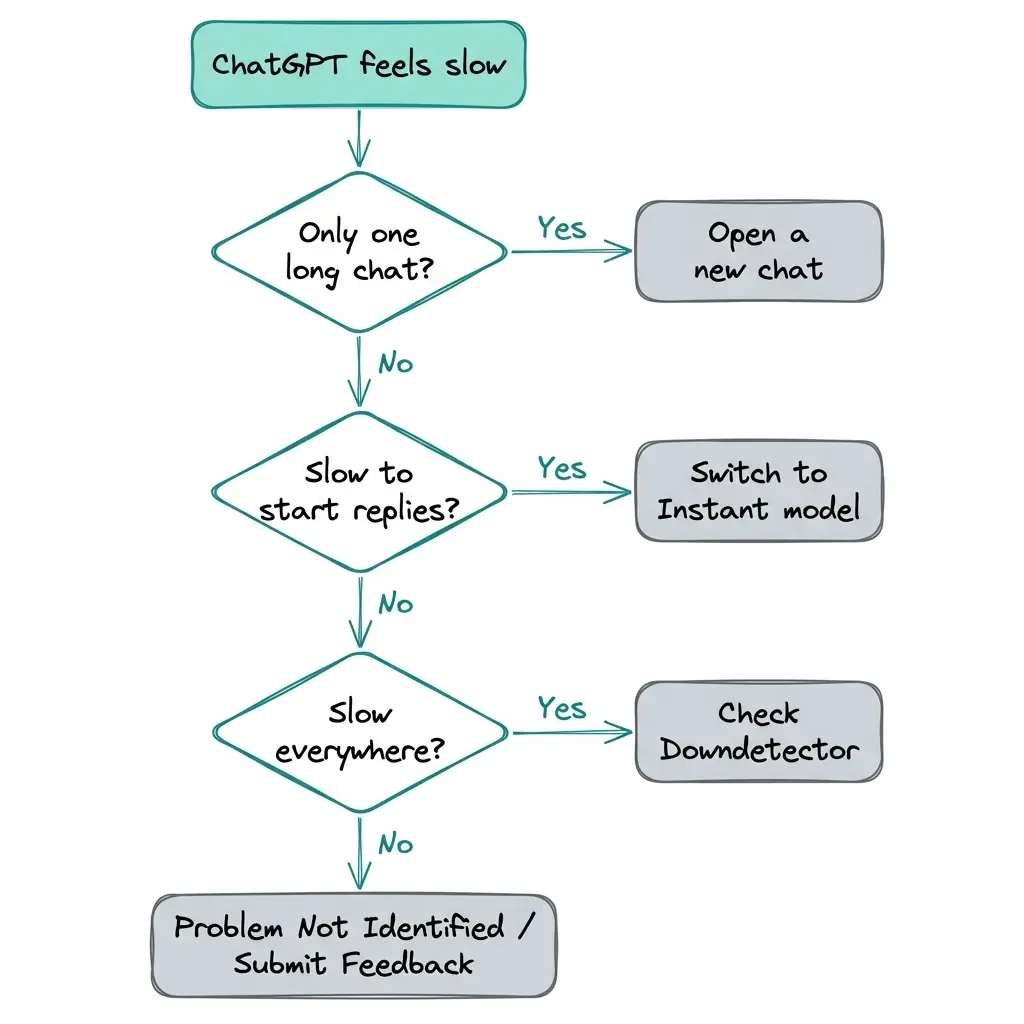
Start at the top and stop as soon as it's fixed. Most people never get past the first four rows.
| Fix | When it helps | Effort |
|---|---|---|
| Open a new chat | Typing lags in one long thread | 10 seconds |
| Switch to a faster (Instant) model | Replies are slow to start on simple tasks | 10 seconds |
| Test in an incognito window | Suspect cache or an extension | 1 minute |
| Clear cache / disable extensions | Incognito was noticeably faster | 2 minutes |
| Check Downdetector + OpenAI status | It's slow everywhere, all at once | 1 minute |
| Toggle off browser hardware acceleration | Rendering stutters, fans spinning | 2 minutes |
| Install a DOM-trimming extension | You live in long chats and can't restart | 5 minutes |
| Summarize and start fresh | You need the context but not the lag | 5 minutes |
A few of those deserve a note.
The summary-and-restart trick is the one I reach for most when I can't just abandon a chat. Ask the model: "Write a dense, complete summary of everything we've established so far – goals, decisions, rules, open questions – leaving nothing important out." Copy that, open a fresh chat, paste it back in, and you're running at full speed again with most of your context intact. Fair warning: it's a lossy save. The model can quietly drop a nuance or two, so for delicate coding or creative threads, skim the summary before you trust it.
DOM-trimming extensions like the community-built Speed Booster for ChatGPT genuinely work – they force the lazy loading OpenAI didn't, and typing goes back to instant. But my old law-student instinct kicks in here: any extension powerful enough to rewrite ChatGPT's page is also powerful enough to read everything on it. Most are clean and run entirely on your machine, but extensions get sold and compromised all the time. If you're pasting anything sensitive into ChatGPT, think hard before handing a third-party tool that level of access.
If it's slow everywhere, triage the machine and the connection. When fresh chats, a different browser, and even your phone all crawl, no single conversation is the villain:
In your browser settings, switch hardware acceleration off and restart. If things smooth out, your GPU was straining to render ChatGPT's animated, markdown-heavy output.
Open an incognito window with your VPN, ad blockers, and security extensions disabled, to confirm none of them are choking the live connection to OpenAI's servers.
Give the OpenAI status page and Downdetector one last look before you torch an afternoon chasing a problem that's on their end.
Want It Permanently Faster? Change How You Use It
The fixes above are first aid. These are the habits that keep it from happening:
Keep Chats Topic-Sized
One chat per project or question. When it gets long, summarize and roll over. Endless mega-threads are the root of 90% of the lag I see.
Pick the Right Model by Default
Fast model for everyday stuff, reasoning model only when you need it.
App vs. Browser Actually Matters
On a Mac, the desktop app is built natively and tends to feel snappier than a browser tab. On Windows, heads up – the official app is essentially the web app in a desktop wrapper, basically a whole browser in a trench coat. It inherits the exact same memory bloat and typing lag as the web version, so don't expect a miracle there (at least for now).
Power-User Option
if you practically live in long chats, you can skip OpenAI's interface entirely and pipe your API key into a frontend like LibreChat or TypingMind. People who've switched report dramatically smoother long-context rendering. The trade-offs are real, though: you pay per token instead of a flat monthly fee (a runaway session can get expensive), and you lose the polished extras like voice mode and built-in browsing. It's a fix for a specific kind of heavy user, not for everyone.
Are Alternatives Actually Faster?
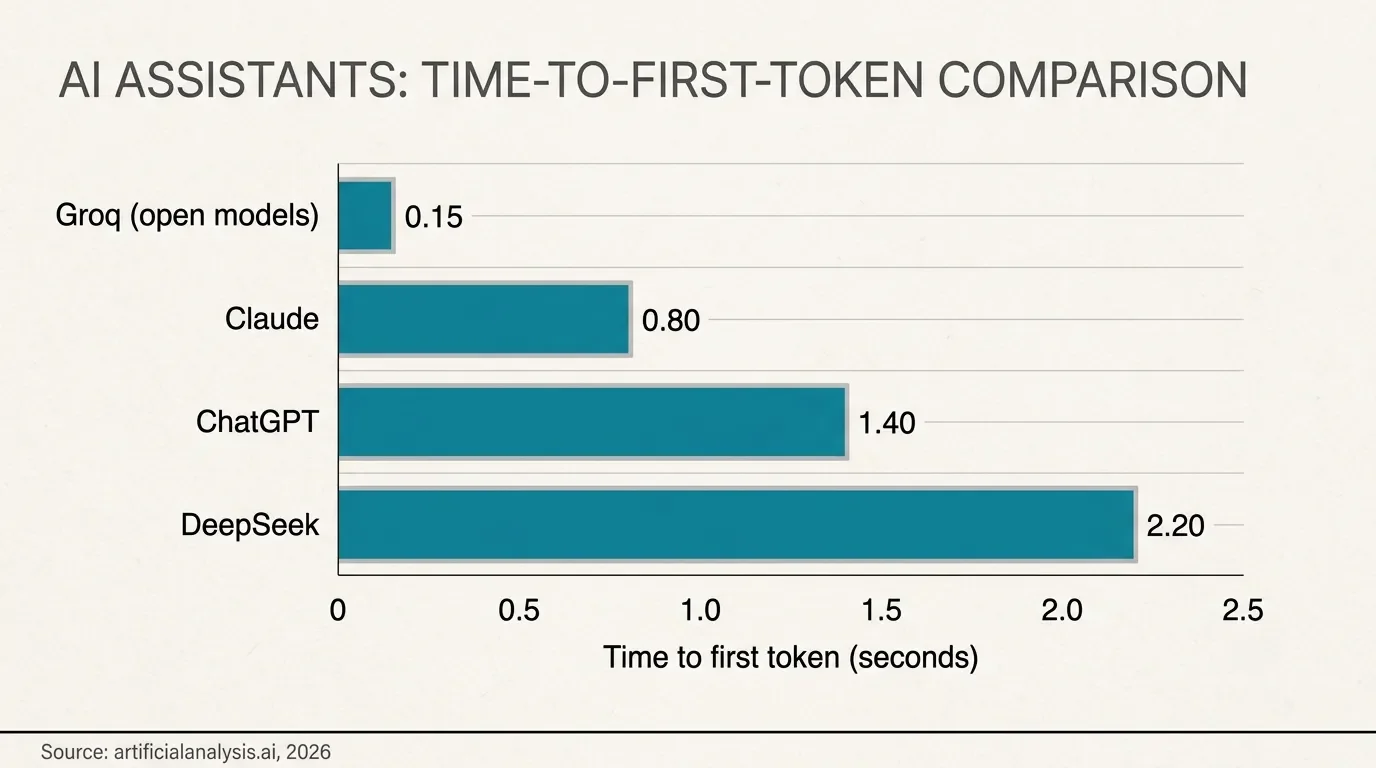
Since "just switch tools" gets tossed around so freely, here's some actual data. Claude tends to feel more consistently responsive for long, document-heavy work, even when its raw time-to-first-token isn't actually quicker on paper. DeepSeek's reasoning model is sharp on math and logic but slow off the line, for the same "thinking out loud" reason the o-series drags. And if you want genuinely blistering speed, tools running on specialized inference hardware like Groq can push hundreds of words a second – but only on open models, not GPT itself.
The honest takeaway: nobody has quietly solved latency. They've each picked different trade-offs, and for most people the hassle of switching ecosystems outweighs the handful of seconds you'd claw back. I tested the alternatives, came away impressed, and still do a lot of my daily work in ChatGPT. I just keep my chats short.
Does Paying More Make ChatGPT Faster?
This is the part I want to be blunt about, because it's where people waste money. Upgrading your plan raises your usage limits and keeps you off the slower fallback models during heavy days – the pricier Pro tiers give you a lot more headroom before you get throttled. That's a real benefit if you're constantly hitting caps, and the tier breakdown is worth a look if you're deciding.
But here's the catch: paying more does nothing for browser typing lag. That lag is a front-end interface problem, not a server one. Spend up to $200 a month and your overgrown chat will still stutter exactly the same, because you're running the same web app. If you're weighing whether a subscription is worth it for your actual usage, I went deep on that in Is ChatGPT Plus Worth It in 2026? (Free vs Go vs Plus vs Pro) – this slowness issue shouldn't be the reason you upgrade.
One more thing the law degree won't let me skip: on the standard consumer plans, OpenAI can use your chats to train future models unless you opt out in your data settings, per their privacy policy. That matters here specifically because the "just paste it into a fresh chat" advice means people dump proprietary code and personal info into new threads to dodge the lag. Fast and careless is still careless.
What Actually Fixed It for Me
After all the testing, my real setup is boring and it works. I keep chats short and ruthlessly start new ones – one thread per article, not one thread per month. When I genuinely need the history, I use the summary-and-restart trick. I default to a fast model and only reach for a reasoning model when I'm stuck on something hard. I haven't bothered with API frontends, because for my workflow the lost features aren't worth it, and I'm wary enough about extensions that I only run one I've actually vetted. None of this is really about gadgets, though – if you want to get genuinely good at working alongside AI rather than just stopping it from lagging, Co-Intelligence is the one book I'd hand you first.
The thing that surprised me most? How much of the "ChatGPT is broken" frustration I see at work disappears with a single new chat. It's almost never the model. It's almost always the tab.
The Bottom Line
If you remember three things: open a new chat when typing lags, switch to a faster model when responses are slow to start, and check Downdetector when it's slow everywhere. That covers the vast majority of cases, and none of it costs a cent. Most ChatGPT slowness lives in your browser, not OpenAI's servers – which is oddly good news, because it means the fix is usually in your hands and takes about ten seconds.
I'm genuinely curious where you land on this. Have you found a fix that survived a 40,000-word monster thread, or a model that keeps its speed when everyone else's crawls? Drop your setup and your worst lag horror story in the comments below.
And if you'd rather not babysit every quiet ChatGPT update yourself, that's more or less my job. Subscribe to my Tech newsletter and I'll send you the plain-English version whenever a model swap or interface change actually changes how fast your AI feels.








FAQ
-
If it was fine yesterday and crawling today, the problem is almost always on OpenAI's end, not yours – usually a traffic spike or a model rollout. Check Downdetector for a wave of reports, and if the rest of the internet works fine while only ChatGPT drags across brand-new chats, give it an hour. These congestion episodes tend to clear on their own.
-
No, and this is the misconception I run into most. The lag comes from the single long conversation you currently have open, not the pile of old chats sitting in your sidebar. Deleting history frees up nothing that matters for speed – starting a fresh chat for your current task is the move that actually helps.
-
The mobile apps are generally lighter than a stuffed browser tab, so a thread that stutters on your laptop can feel perfectly smooth on your phone. If it's the reverse, suspect a weak mobile signal or an older device that's short on memory. Either way, a 40,000-word conversation is heavy everywhere – it just punishes a loaded-up desktop browser the hardest.
-
Almost never. Unless your connection is genuinely limping, bandwidth isn't the bottleneck – the delays come from server-side processing and browser rendering, and a faster line touches neither. Save the money; opening a new chat does far more than a new router ever will.
-
That word-by-word stream is completely normal – the model writes one token at a time and you're watching it happen live. In a fresh chat it should feel quick; a long pause before the first word appears is time-to-first-token, usually down to server load or a reasoning model thinking things through. That's a separate issue from the laggy, letter-by-letter typing in your input box, which is purely your browser straining.
-
It can be, depending on the task and the day. As I covered above, Claude often feels steadier than ChatGPT in long, document-heavy sessions, while the raw speed crown keeps changing hands with every new release. The honest answer is that every major assistant bogs down with reasoning modes and huge contexts, so switching purely for speed rarely pays off.
MOST POPULAR




LATEST ARTICLES






I used ChatGPT daily for years, then tested DeepSeek vs ChatGPT side by side for two weeks. Here's where each one actually wins my workflow.