
ChatGPT Network Error: How to Fix It (2026)

The Short Version
Most "ChatGPT network error" messages aren't your internet – they're a dropped streaming connection.
- Error only on long answers or code? Ask for the output in chunks and type "continue."
- Fails the instant you hit send? An extension or your DNS is blocking it – test in Incognito.
- On a VPN (especially Cloudflare WARP)? Set up split tunneling – the single most effective fix. Full step-by-step fixes, by symptom, below.
Few things kill my momentum like watching ChatGPT type out a gorgeous, 400-line answer – and then, a half-second before I can actually read it, the whole thing collapses into a gray box: "A network error occurred. Please check your connection and try again."
I see that message a lot. I use ChatGPT every single day, mostly for long coding experiments and research-heavy drafts, and that's exactly the kind of work that trips this error the most. So I've spent more time than any reasonable person should figuring out why it happens.
Here's the short version, and it's going to annoy you: most of the time, it has nothing to do with your internet.
Let me explain what's really going on – then walk through the fixes, matched to whatever's actually breaking your connection.
What "A Network Error Occurred" Actually Means
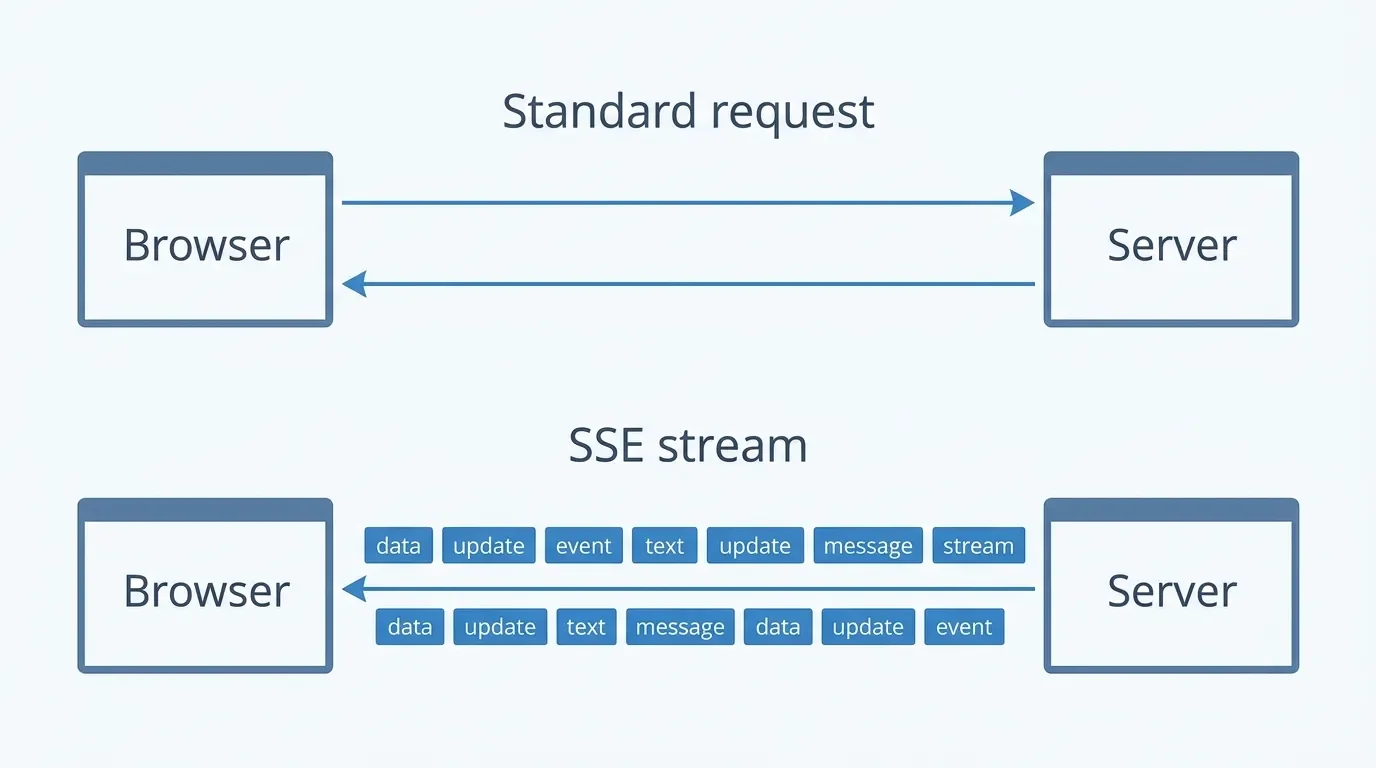
Most websites work like ordering a pizza. You ask for a page, the server boxes the whole thing up, and it arrives in one delivery. Done.
ChatGPT doesn't work like that. It streams text to you word by word as the model generates it, using a technology called Server-Sent Events (SSE) that holds a single HTTP connection open the whole time. Think of it less like a pizza delivery and more like a live phone call – the line has to stay open and stable the entire time you're "talking." As one nice technical breakdown of how ChatGPT streams text puts it, the connection is continuous, not a one-and-done request.
That's the whole problem in a nutshell. If that live connection hiccups for even a second – your IP address shifts, a firewall gets nervous, a timeout fires – the call drops. And when it drops, you don't get a detailed diagnostic. You get the same vague "network error" no matter the actual cause. OpenAI's own troubleshooting docs confirm that things like DNS filtering and blocked streaming connections all funnel into this one generic message.
So when people say "check your connection," they're not wrong, exactly. They're just looking at one tiny corner of a much bigger picture.
Why ChatGPT Shows a Network Error on Long Responses
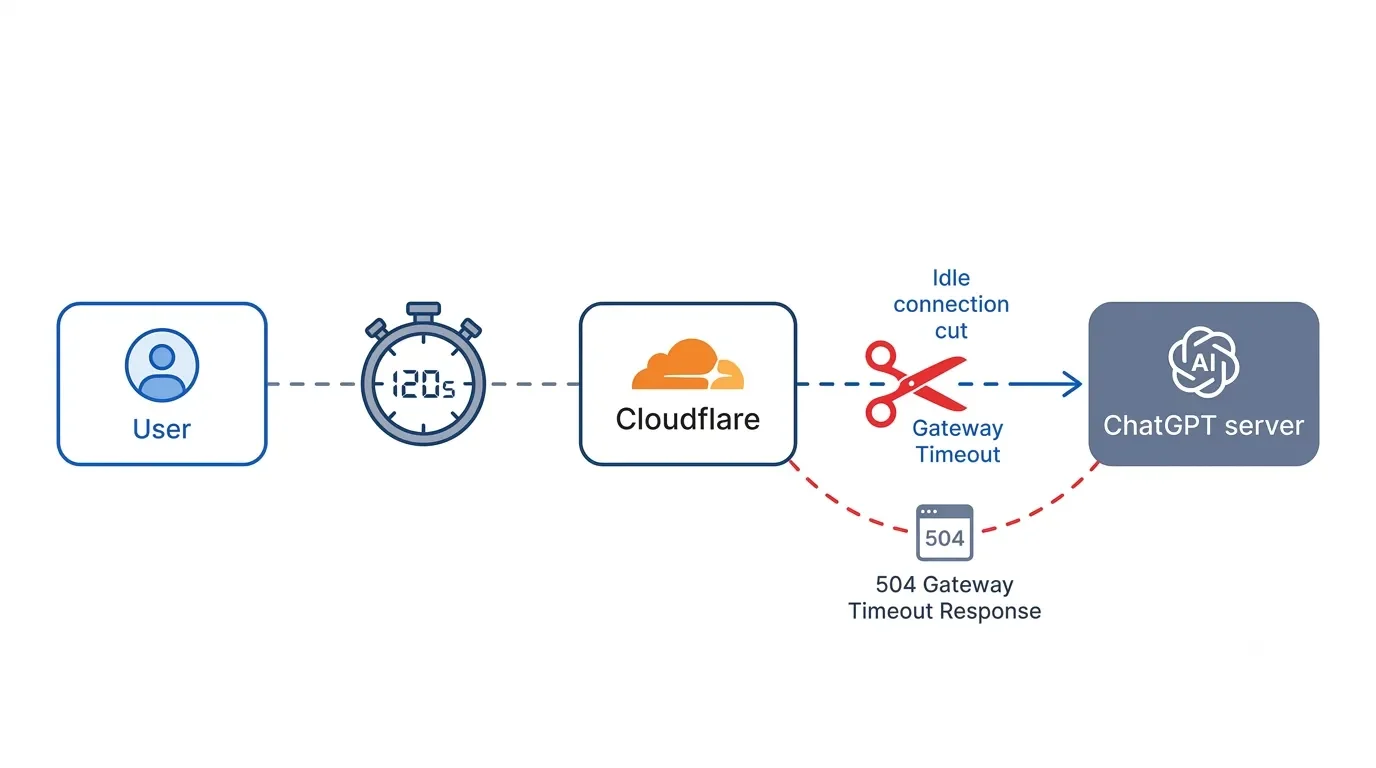
This is the version I hit most, so let me be specific about it.
OpenAI sits behind Cloudflare, which acts as a giant traffic cop in front of their servers. Cloudflare enforces a strict response timeout – officially Error 524. It's commonly cited as a 100-second cutoff, though Cloudflare's current default is 120 seconds. In plain terms: if the server goes quiet for too long while it's thinking, the traffic cop assumes the connection is dead and cuts it off. The longer and more complex your request, the more likely the model pauses long enough to trip that wire.
A few flavors of this:
Massive Code Blocks
Big single-shot code dumps are still the most reliable way to trip this, but there's no magic line count anymore – the ceiling shifts with the model and has actually crept lower over time, with people clocking cutoffs anywhere from a few dozen lines in Canvas to a thousand-plus in a long chat. The pattern holds: the bigger the one-shot output, the likelier it dies before finishing.
Deep Reasoning (“Thinking” Mode)
With the heavier reasoning models, some users describe waits of 12 minutes or more that end in a network error and a completely empty response. The model out-thought the gateway's patience.
Bloated, Long-Running Chats
That ancient thread you've been adding to for two weeks? The server has to reload its entire history every time you send a message, and that replay can choke.
If slow, stalling answers are your bigger headache, I went deeper on that in Why Is ChatGPT So Slow? – it pairs well with this guide.
How to Fix the ChatGPT Network Error (Step by Step)
The trick is to match the fix to your symptom. Here's the order I'd actually try things in.
Fix 1: Make Sure It's Not an OpenAI Outage
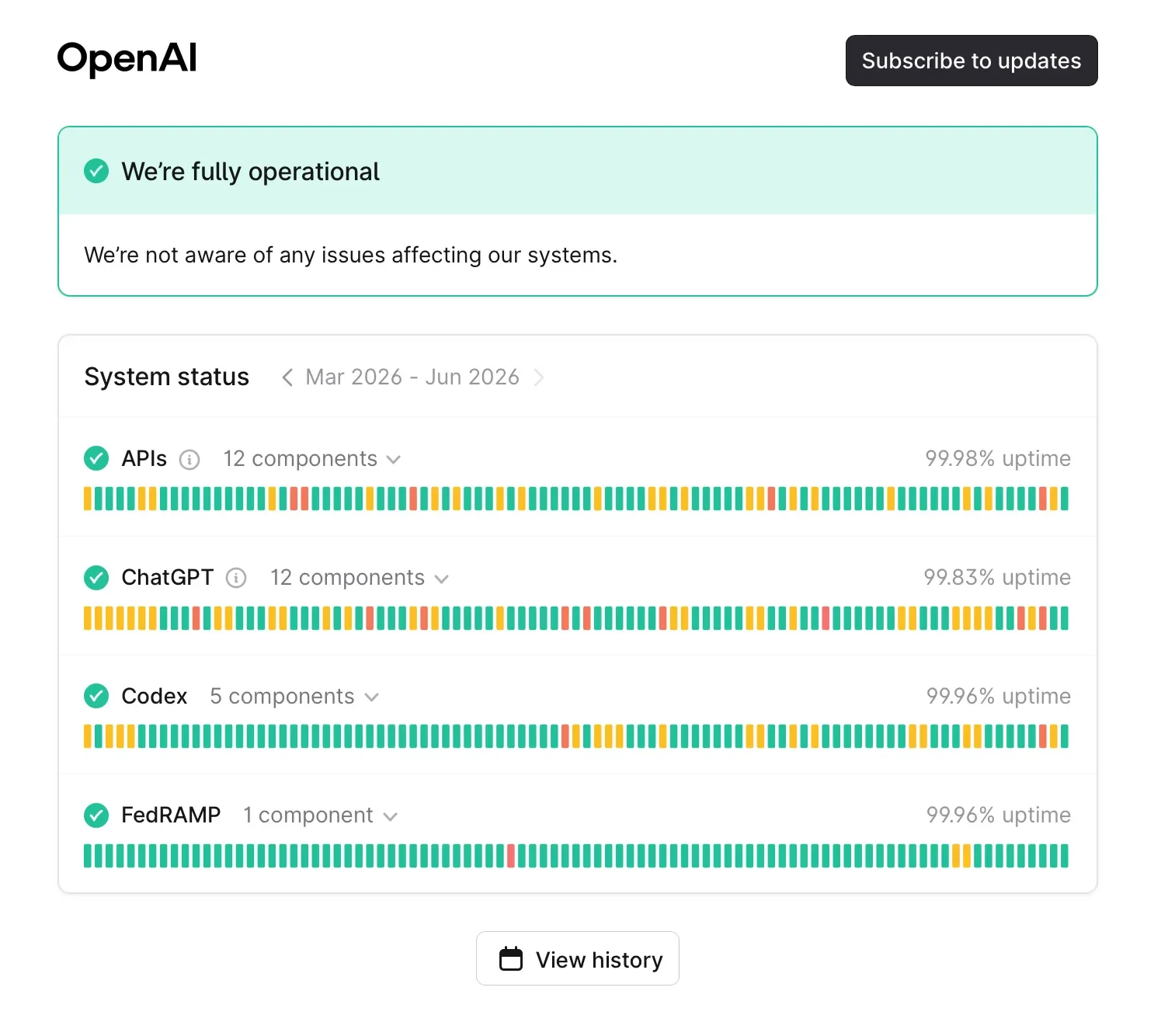
Before you tear apart your whole setup, do the five-second check: visit status.openai.com. If the servers are having a moment, no amount of DNS-swapping will help.
This matters more if you're on the free tier, which gets deprioritized when traffic spikes and is far more prone to load-related errors at peak times. If you keep running into walls during busy hours, that's part of what a paid plan buys you – I broke down whether that's worth it in Is ChatGPT Plus Worth It in 2026? (Free vs Go vs Plus vs Pro).
Fix 2: Long Answers and Code – Break the Output into Chunks
If the error only strikes on huge responses, stop asking for everything at once. You're basically daring the gateway to time out.
Instead, I add a pacing instruction right into the prompt: "Generate this in blocks of no more than 50 lines. Stop after each block and wait for me to type 'continue.'" Every "continue" starts a fresh request and resets that 100-second clock. This is an old trick – a StackExchange thread recommended it years ago – but the logic still holds today.
Is it a little tedious? Yes. But it also means your work saves incrementally, so a drop doesn't nuke the whole thing.
And if the error is coming from a giant, long-running chat, try compressing it: ask ChatGPT to "summarize everything above into a lossless summary keeping all key decisions and variables," then paste that into a brand-new conversation. You keep the context and ditch the heavy history that was crashing the session.
Fix 3: "Thinking" Mode – Switch to Instant
When I ask for something heavy and it just sits there spinning past the three-minute mark, I stop waiting. I switch the model from the deep-reasoning "Thinking" option back to the faster "Instant" one and re-run it. As coverage of ChatGPT's usage tiers notes, the lighter model returns a first token much faster, which sidesteps the long stalls that trigger the timeout.
The trade-off is there of course: you lose some depth on genuinely complex reasoning or math. For most of what I do day to day, the speed and stability are worth it, though.
Fix 4: VPN and Cloudflare WARP Users – Use Split Tunneling
If you run a VPN, here's a dirty secret: many of them, including Cloudflare WARP, quietly change your route and even your IP address mid-connection to optimize speed. For normal browsing, you never notice. For a live ChatGPT stream that needs one stable IP from start to finish, it's fatal. The Cloudflare community has a detailed write-up confirming exactly this.
Turning the VPN off works, but that's a sledgehammer. The smarter move is split tunneling – you tell the VPN to leave OpenAI's traffic alone while everything else stays protected.
Open your VPN client's settings (WARP, NordVPN, your work's Cisco AnyConnect, whatever you use).
Find the split tunnel or "exclude/bypass" list. Make sure it's set to Exclude, not Include.
Add OpenAI's domains: chatgpt.com and *.chatgpt.com, chat.openai.com, api.openai.com, auth0.openai.com, and *.openai.com. For good measure, add *.oaiusercontent.com, *.oaistatic.com, and *.featuregates.org, which OpenAI's network recommendations flag as required.
Save and restart the VPN.
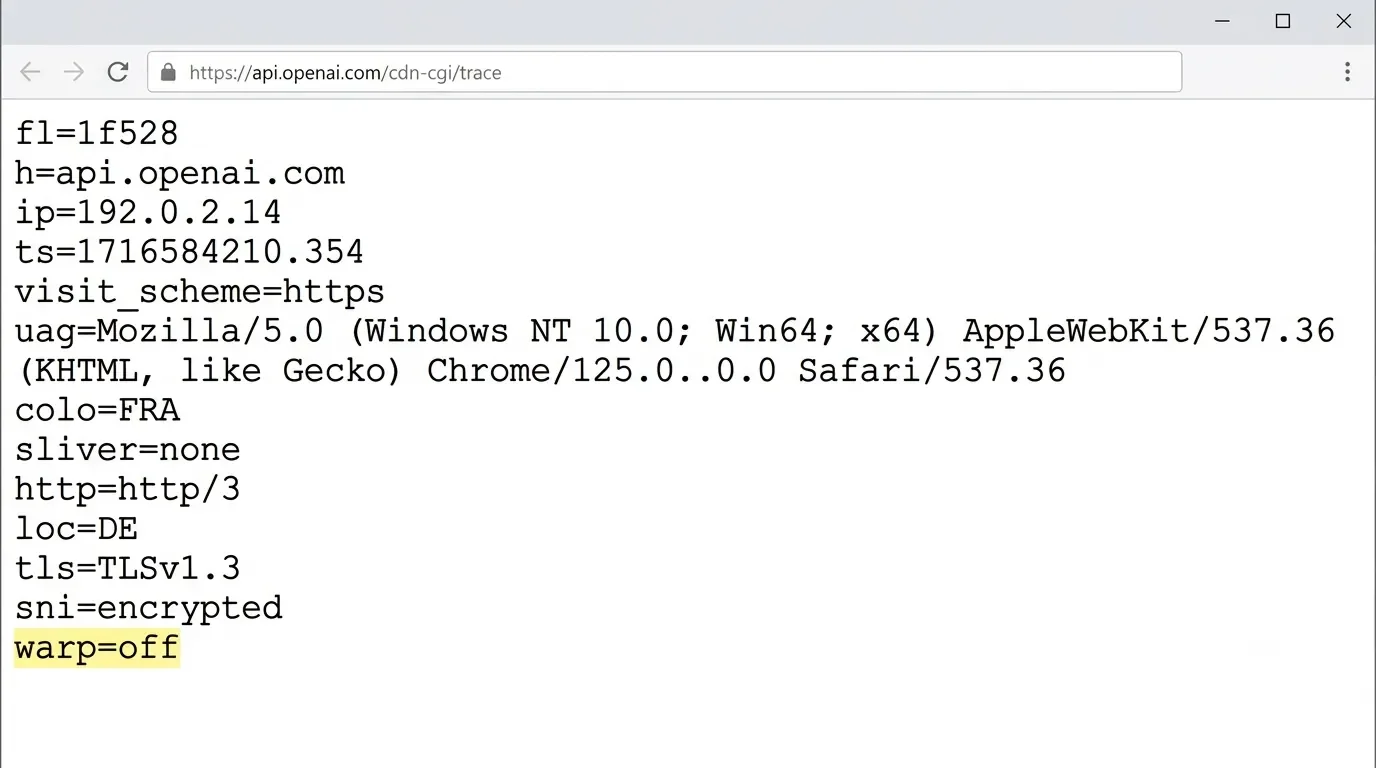
To confirm it worked, visit https://api.openai.com/cdn-cgi/trace. If you see warp=off and your real ISP IP, you're set.
One honest caveat, and my law-school paranoia is showing here: split tunneling means OpenAI now sees your real IP, and on a work device it can route you around your company's security monitoring. Don't do this on a managed machine without asking IT first.
Fix 5: Diagnose Browser, Extension, and DNS Interference
Does it fail instantly when you hit send, rather than dying mid-stream? Then something local is blocking the connection before it can even start.
Test in Incognito/Private Mode
This disables your extensions. Ad-blockers like uBlock Origin are notorious for severing these streams. If it suddenly works in Incognito, an extension is your culprit – re-enable them one at a time to find it.
Swap Your DNS
ISP "secure DNS" and filtering can blackhole OpenAI's endpoints. Switching to a public resolver like Google's 8.8.8.8 or Cloudflare's 1.1.1.1 clears this up for a lot of people, as seen in this OpenAI subreddit thread. If you'd rather fix this once for every device instead of redoing it per machine, a router like the GL.iNet Flint 2 lets you set a public resolver network-wide – and its built-in WireGuard makes the split tunneling from Fix 1 painless too.
Hard Refresh
Cmd/Ctrl + Shift + R forces the browser to dump stale, possibly corrupted session tokens. This is the one time the "just refresh" crowd is right.
Fix 6: Corporate, School, and Locked-Down Networks
If this only happens on your office or campus connection, the network itself is likely the problem. Plenty of corporate firewalls block the long-lived streaming connection ChatGPT depends on, and SSL-inspecting proxies like Zscaler can choke on the HTTP/2 connection entirely. You'll often log in fine, then stall the instant you send a prompt.
There's no clever client-side trick here. The real fix is getting IT to allowlist OpenAI's domains – the same wildcard list from OpenAI's network recommendations. Annoying, but at least you now know exactly what to ask them for.
On Mobile? Don't Lose Your Answer
Quick but important warning for the app. When a network error hits mid-response on iOS or Android, your instinct is to force-close and reopen. Resist it. As I and users on the OpenAI forum have documented, closing the app often permanently erases the in-progress message because of how the app caches things. I learned this the hard way on a train, watching a great answer evaporate. If you can still see the text, copy whatever's there before you touch anything else.
Should You Just Switch to Claude or Gemini?
Fair question. If ChatGPT keeps failing you, is the grass greener elsewhere? Honestly, it depends on why it's failing. Here's how the big three stack up on the stuff that actually causes these drops, based on my experiences, community reports and a comparison of their usage limits.
| What you care about | ChatGPT | Claude | Gemini |
|---|---|---|---|
| How it fails | Drops the stream with a "network error" | "Failed to fetch," often on huge uploads | Tends to silently forget context instead of dropping |
| VPN/proxy resilience | Low – IP changes break it instantly | Low – proxies like Zscaler block it | Moderate, especially inside Google's ecosystem |
| Long code generation | Struggles near ~1,500 lines; needs chunking | Very stable for long outputs | Can lose formatting partway through |
| Best for | General use, iterative coding in chunks | Big files, long zero-drift code | Deep Google Workspace integration |
My take: if your pain is long code drops, Claude genuinely handles big outputs more gracefully. But if your problem is a VPN or a corporate firewall, switching apps won't save you – you'll just trade one network error for another. Fix the connection first. And if you're stepping back to rethink how you lean on all of these tools day to day, Co-Intelligenceby Ethan Mollick is the best big-picture read I've found on working alongside them.
How to Stop the Network Error from Coming Back
A few habits have cut these down to almost nothing for me:
Keep chats focused and start a new conversation for each new task instead of feeding one endless mega-thread.
Chunk big requests by default, especially code and long research.
Pick one stable network and avoid flipping your VPN on and off mid-answer.
Match the model to the job – save deep Thinking mode for when you actually need it.
None of this is glamorous, but it's the difference between fighting your tools and actually getting work done.
Wrapping Up
The "A network error occurred" message looks like a dead end, but it almost always has a specific, fixable cause hiding behind that vague wording. Figure out which version you're dealing with – VPN, long output, browser, network, or outage – and the right fix is usually one setting away. For me, chunking alone solved most of it.
Which version of this has been haunting you – the VPN drop, the long-code timeout, or the locked-down work network? Tell me what finally fixed it, or what's still breaking, in the comments below.
And if you'd rather have fixes like split tunneling on hand before you hit the wall, subscribe to my newsletter – I send practical AI-tooling teardowns like this from time to time without any spam.







FAQ
-
Usually because your phone is hopping between Wi-Fi and cellular, which shifts your IP mid-stream – the same instability that breaks the connection on a VPN. Lock the phone onto one stable network and the errors tend to drop off. And as covered above, resist force-closing the app when it hits mid-response, because that's exactly when you lose the answer.
-
Partly. A paid plan gets you prioritized when traffic spikes, so the load-related drops that plague the free tier at peak times ease up. But it does nothing for the real culprits – a VPN reshuffling your IP or a corporate firewall choking the streaming connection both break things the same way on any plan. I dug into whether the upgrade is worth it overall in the Plus breakdown linked earlier.
-
No. Rate limits and account issues come with their own specific messages, while the network error is a dropped connection, not a permissions problem. If you can refresh and immediately send a short prompt that works fine, you haven't been limited – your long or stalled request just timed out.
-
If the response has gone completely silent past the two-to-three minute mark, it has almost certainly hit that 100-second-style timeout and won't recover, so refresh and re-run it. Don't sit staring at a frozen "Thinking" spinner. On heavy requests, switching to the faster Instant model (Fix 3) gets you a first token before the timeout window even becomes a problem.
-
Your saved conversations are safe – the error only affects the single in-progress response, not your stored history. The one real risk is on mobile, where force-closing the app mid-stream can wipe the unfinished message before it saves. On desktop, a refresh just reloads the chat with all your earlier messages intact.
-
Often, yes – the API lets you set your own timeouts and handle the streaming in code, so you're not stuck behind the same gateway limits as the ChatGPT web app. The catch is that it's pay-per-token and takes some technical setup, so it's overkill unless you already write scripts. For most people, the chunking trick in Fix 2 solves the same problem without the extra plumbing.
MOST POPULAR




LATEST ARTICLES






I've used Gemini image generation almost daily for months. Here's how to create and edit images, what the free limits really are, and my best prompts.