
Can Canvas Detect ChatGPT? What Your School's LMS Actually Sees
The Short Version
Canvas has no native AI detector. What can flag you: third-party add-ons your school pays for (Turnitin, Copyleaks), the quiz log that timestamps tab-switches and pauses, and a real proctoring tool like Respondus if your professor requires it.
- You are probably fine if you wrote the work yourself and your course uses plain Canvas assignments with no plagiarism add-on.
- You are exposed if your instructor has Turnitin's AI writing report switched on, runs locked-down proctored quizzes, or reads quiz logs as gospel.
Let me give you the honest answer before the nuance: Canvas does not have a built-in ChatGPT detector. There is no hidden AI radar that scans your essay the second you hit submit. The platform itself ships with nothing that can read a paragraph and declare "a robot wrote this."
Yet Canvas is not blind, either.
I spent the better part of a decade inside universities before I moved into tech and writing full-time – a few years of psychology in Düsseldorf, then six years of law in Cologne That is a lot of online quizzes. So when students ask me whether Canvas can "catch" ChatGPT, I get why the question feels so loaded. The truth sits in an awkward middle: Canvas does not understand your words, but it quietly records your behavior, and your school can bolt on tools that do try to read your words. Those are two very different things, and confusing them is exactly how rumors start.
Here is what Canvas actually sees, what it definitely does not, and where the real risk hides.
Does Canvas Have Built-In AI Detection?
No. Out of the box, Canvas (made by a company called Instructure) has zero ability to tell whether text came from you or from a chatbot. Any "AI score" a professor sees inside the grading screen came from an external tool that someone at the university licensed, switched on, and paid for. It is not Instructure's own code making that call.
And now for the irony that genuinely made me laugh. While universities are spending real money to detect and punishAI use, Instructure signed a global partnership with OpenAI in July 2025 to embed generative AI directly into Canvas – think LLM-powered assignments, automatic translations, and rubric generation, with broader AI features like discussion summaries documented in UChicago's rundown of AI in Canvas. So the same platform that your school uses to flag a chatbot is busy building chatbots into its core. The left hand bans what the right hand sells. Keep that in your back pocket – it tells you how unsettled this whole space really is.
What AI Detector Does Canvas Use?
When a school does turn on AI detection, it is almost always one of two names: Turnitin or Copyleaks. They plug into Canvas through a standard integration and drop their report right into the grading view, so the instructor never leaves the page.
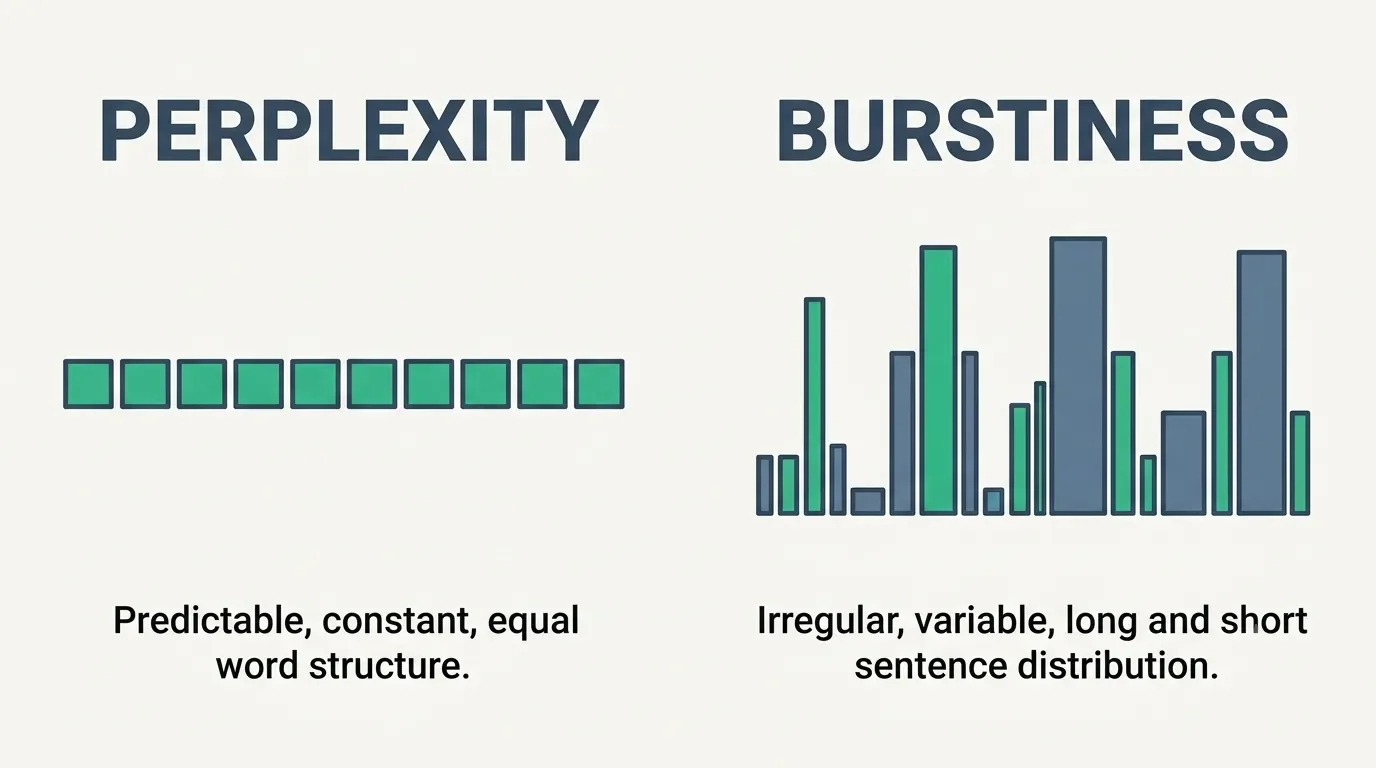
Here is the thing I feel like nobody explains in plain language. These tools are not reading for meaning. They are doing statistics. Two words matter:
Perplexity – how predictable your word choices are. Chatbots pick the most statistically likely next word, so their writing tends to be too smooth.
Burstiness – how much your sentence lengths vary. Humans ramble, then snap. We write a long, winding sentence and then a short one. Models tend to flatline.
My old psychology coursework was basically applied statistics with a human face, so this is the part that fascinates me – and worries me. If the detector is just measuring "predictable and evenly paced," then anyone who writes in clean, simple, consistent English looks suspicious. Guess who writes in clean, simple, consistent English? People writing in their second or third language.
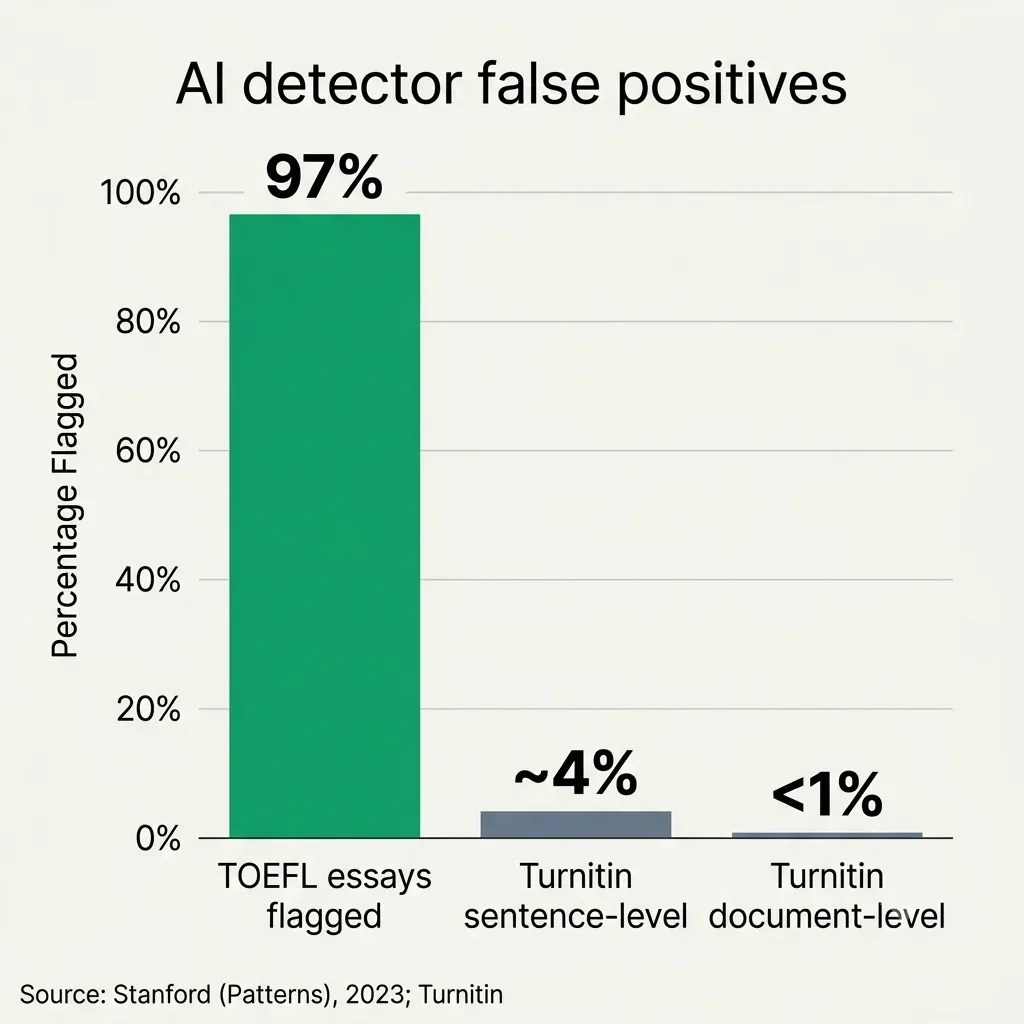
That is not a hypothetical. A Stanford study published in Patterns found that 97% of genuine TOEFL essays from non-native English speakers got flagged as AI by at least one detector – exactly the kind of finding that pushed schools like UCLA to keep Turnitin's AI detector switched off. Think about that. You can write every word yourself and still get accused, simply because your prose is tidy. As a German who writes for an American audience all day, that one stings.
Can Canvas Detect Copy and Paste?
This is the most common question I get, and the answer is a careful "not the way you think."
Canvas does not read your clipboard. It cannot see that you copied a paragraph out of ChatGPT in another window and pasted it in. That myth needs to die.
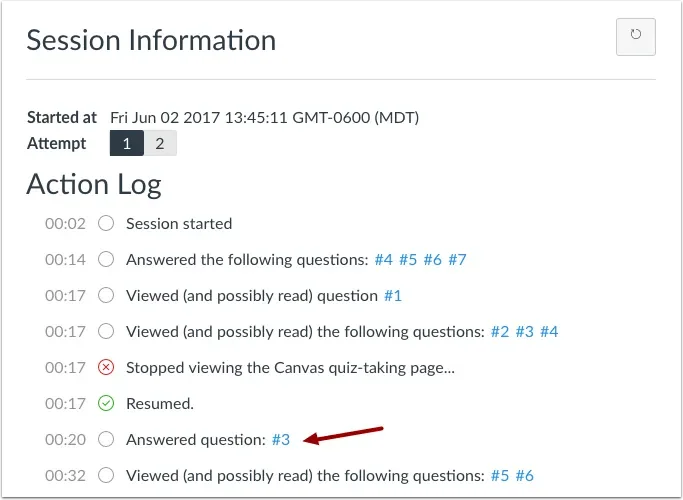
What Canvas does have is the quiz log – a timeline of timestamps for when you viewed a question, answered it, and moved on. Some instructors try to reverse-engineer copy-pasting from that. If a 250-word essay answer appears in the log as submitted in eight seconds, well, you did not type 250 words in eight seconds. That is the inference. A few technically-minded professors go further and inspect the raw formatting of pasted text for stray styling tags, though that is community folklore, not an official feature.
Here is the kicker, and it comes straight from the source. Instructure's own quiz log documentation explicitly states that quiz logs "are not intended to validate academic integrity or identify cheating for a quiz." The company that built the log is telling you it is not reliable evidence. My old law-student instinct lights up here: if the manufacturer disclaims it, it is weak evidence at best.
Can Canvas Detect Split Screen or Tab Switching?
Credit: Instructure
Partly, and this is where people get burned by a system flaw rather than by actually cheating.
When you click away from a Canvas quiz to another tab or app, your browser fires a "blur" event, and Canvas logs a tidy little entry: Stopped viewing the Canvas quiz-taking page. Click back, and it logs that you resumed. It is genuinely tracking when you left the window. It is not reading which tab you opened, your search history, or your second monitor. Canvas has no idea whether you tabbed over to Google or to a cat video.
Now the flaw. That same log gets tripped if you simply sit still. CSU Chico's IT team documented how a low-battery alert, a background app, or just reading a hard question without touching your mouse for about 30 seconds can fire the exact same "stopped viewing" entry. So a student who paused to think looks identical in the log to a student who tabbed out to cheat. And pauses are not the only false trigger – a dropped connection fires the same flag, so if your home Wi-Fi is flaky, a backup mobile hotspot like the NETGEAR Nighthawk M6 keeps a brief outage mid-quiz from being misread as you tabbing away. I find that genuinely unfair, and it is why a log full of scary-looking "left the page" flags often means nothing at all.
The one real exception: if your course uses Respondus LockDown Browser or a similar proctoring tool, the rules change completely. Those tools take over your machine, disable the clipboard, and block other windows. If the course also turns on its webcam-based companion, Respondus Monitor, you get recorded on camera too – but that is a separate add-on, not LockDown Browser by itself. That is not Canvas anymore – that is a separate piece of surveillance software your school chose to deploy.
How Does Canvas Detect Cheating Overall?
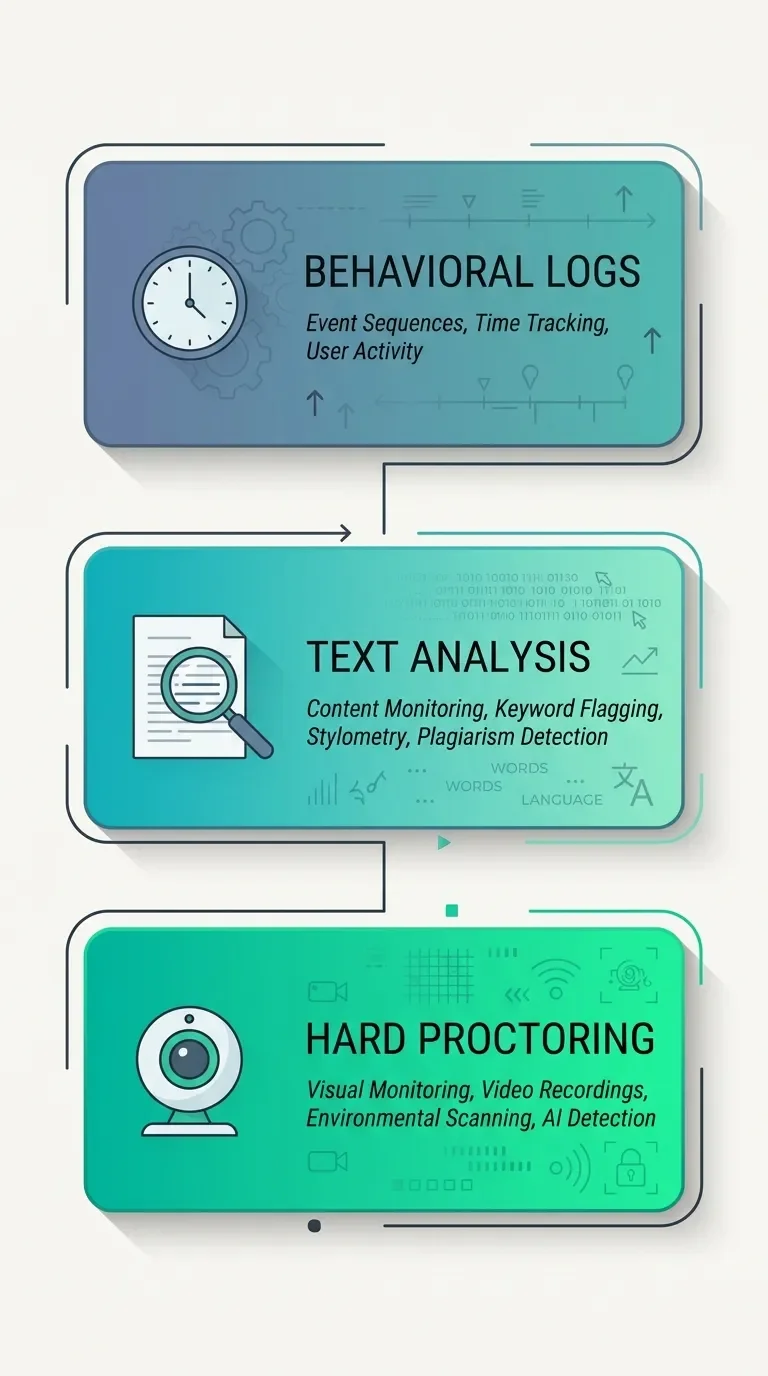
It helps to stop thinking of "Canvas" as one thing and instead picture three layers stacked on top of each other:
Behavioral logs (native): timestamps, tab-switch flags, time-per-question. Always on, but officially unreliable as proof.
Text analysis (add-on): Turnitin or Copyleaks scanning prose for AI patterns. Only present if your school paid for it and your professor enabled it.
Hard proctoring (add-on): Respondus, Honorlock, Proctorio – clipboard locks, room scans, webcam monitoring. Only when explicitly required for an exam.
Most everyday assignments only involve layer one. The deeper layers cost money and stir up student backlash, which is exactly why so many of them are switched off.
And if you do land in a course that requires webcam proctoring, a dependable external webcam like the Logitech C920 is worth having – a frozen or low-light built-in camera can trip a check even when you have done nothing wrong.
Can Canvas Detect ChatGPT in Discussions and Assignments?
For regular file uploads and even discussion posts, the answer depends entirely on whether Turnitin or Copyleaks is running. If it is, your text gets routed through that AI report automatically and your instructor sees a percentage. If it is not, your discussion reply is just text sitting in a box – analyzed by exactly nobody.
This is muddier than it used to be, because Canvas is now layering its own AI-powered summaries and translation tools into discussions. We are heading toward a strange place where the platform paraphrases student posts with AI on one side while a bolted-on detector hunts for AI on the other.
Can Canvas Detect ChatGPT on Multiple-Choice Quizzes?
Short and specific: no, not in the way the question implies. AI detectors work on long-form prose. They need a few paragraphs of your writing to measure that predictability and pacing. A multiple-choice answer is a single click – there is nothing for a detector to chew on.
What can surface on a multiple-choice quiz is behavior. If the log shows you answered 40 tricky questions in 90 seconds flat, that pattern raises eyebrows on its own. The detector is not reading ChatGPT here. The clock is.
What This Actually Means for Students – and a Quick Note for Instructors
So, can Canvas detect ChatGPT? Plain Canvas, no. The text-reading detectors a school can add are real but deeply flawed, and the behavioral logs catch patterns, not chatbots.
But I want to push back on the takeaway a lot of students land on, which is "detection is broken, so I am untouchable." That is the wrong lesson, and here is the honest version.
The detectors are unreliable in both directions. The University of San Diego's law library lays out how easily they can be fooled, and Turnitin itself, in its own false-positive write-up, concedes a meaningful sentence-level error rate. That is precisely why schools like UCLA never switched it on in the first place – keeping Turnitin for plagiarism while leaving its AI detector off – and why other universities quietly dropped the tools over cost and accuracy. A tool that can be beaten by editing a few sentences, yet still falsely accuses honest students, is not something I would bet my degree on – in either direction.
The behavioral logs, by contrast, are dumb but stubborn. They do not lie, but they do not understand context either. They will happily flag you for thinking too long. So if you are a student, the practical advice has nothing to do with beating an algorithm:
Do not paste large blocks into timed quizzes. Type your answers.
Expect to be asked to explain your work. If you used AI to brainstorm, be ready to show you understand the result.
Read your syllabus like I read contracts – the AI policy is usually buried in there.
If you want to get genuinely better at writing work you can stand behind, a classic like They Say / I Say does more for your grade than any trick to dodge a detector.

And for any instructors reading: please treat a quiz log as a conversation-starter, not a verdict. Instructure says so themselves. Accusing a careful, slow-reading, or non-native student on the strength of a "stopped viewing" flag is not integrity enforcement – it is a false positive with a person attached to it. Coursicle's breakdown of what Canvas can really see is a good reality check before anyone hits the panic button.
The technology that watches you is far less certain than it looks. Knowing exactly where its eyes are – and where its blind spots sit – is worth more than any trick to dodge it.
If there is one thing I want you to keep, it is this: the unnerving part of Canvas is not some genius AI reading your essays, it is a dumb log that cannot tell the difference between you cheating and you sitting still to think. We hand this software way more credit than it has earned. So the next time someone in your group chat swears Canvas can see their second monitor, you will know exactly why that is nonsense.
Have you ever been flagged for "leaving the page" when you were just stuck on a hard question – or watched honest work get dumped into an AI report? Tell me what actually happened in the comments below. The real stories tend to be far messier than the tidy policy pages let on.
And if you want the next teardown, I write plain-English breakdowns of what your school's and your apps' tools really track behind the friendly dashboards. Subscribe to the newsletter and I will send each one straight to your inbox.




FAQ
-
Usually not, and that is exactly the weakness of these tools. To avoid falsely accusing real students, detectors are deliberately tuned to let a notable share of AI text slip through, a trade-off the University of San Diego's law library walks through in detail. Editing sentences or adding your own voice tends to break the statistical fingerprint the software hunts for. I would not lean on that, though, because the same fragility that lets edited AI through is what wrongly snags honest writers.
-
Roughly six months. Canvas keeps the detailed Classic Quiz logs for about that window (New Quizzes does not publish a fixed retention period), after which any review has to rely on your actual submission rather than the behavioral timeline. So if a dispute surfaces a year later, the "stopped viewing" timeline you might be worried about may not even exist anymore.
-
It can trigger the same log entry, but it is not proof of anything. As I covered above, a low-battery alert, a background app grabbing focus, or a brief connection drop can all fire the "stopped viewing" event even when you never left your quiz, something CSU Chico documents clearly. If your laptop tends to die at the worst moment, keeping a portable power station like the Anker 521 within reach during a timed quiz is the cheapest insurance against an innocent-looking gap in your log. If it happens to you, screenshot the moment and email your instructor right away – a heads-up in real time is far more convincing than an explanation weeks later.
-
That depends entirely on your course policy, not on Canvas itself. Some instructors are fine with AI for brainstorming but ban it for drafting, while others forbid it outright, so the platform is not the one drawing that line. Read your syllabus closely, and if the wording is vague, ask in writing before you submit. I would rather send one awkward email than sit through an integrity hearing.
-
Stay calm and ask to see the actual evidence, because a detector score is an opinion, not a fact. It helps to point to the documented false-positive problem – a Stanford study found detectors flagged up to 97% of genuine essays from non-native English speakers as AI, which is part of why UCLA kept these tools switched off – and then offer your own proof of authorship: draft history, version timestamps, notes, or a walkthrough of your argument. Most schools have an appeals process, and "the software said so" rarely holds up on its own.
-
No. LockDown Browser locks down the computer it runs on – disabling the clipboard and blocking other windows, as Respondus describes – but it has no awareness of anything outside that machine. The room itself only gets watched when a course adds a separate webcam-based proctoring tool such as Honorlock or Proctorio, which record video and audio of your space. If your exam uses LockDown Browser alone, nothing is monitoring the physical environment around you.
MOST POPULAR


LATEST ARTICLES



I've used Gemini image generation almost daily for months. Here's how to create and edit images, what the free limits really are, and my best prompts.