Can Claude Generate Images?

Credit: Anthropic
Short answer first, because that's probably what you came for: no, Claude doesn't natively spit out JPEGs or PNGs the way ChatGPT or Gemini do. Type draw me a sunset over Cologne into Claude and you'll get a polite explanation, maybe some SVG markup, but no actual picture in the way you'd expect.
So why am I writing 2,000-plus words about it? Because the real story turned out to be far more interesting – and honestly, far more useful if you're building anything serious with AI. Anthropic made a deliberate call to skip the raster image race and lean hard into something else: code, structure, and reasoning. After spending the better part of a year using Claude daily for coding work on tobiasholm.com, and tinkering with SVG diagrams inside my Notion second brain, I've started to think it's the more interesting bet.
Let me walk you through what Claude can do visually, why Anthropic built it this way, and how the Model Context Protocol (MCP) basically erases the limitation anyway. Plus some honest gripes about where it's still annoying.
Why Claude Doesn't Do Diffusion (and Why That's Actually Fine)

Here's the technical bit. Image generators like DALL-E and Midjourney run on diffusion models. You can think of it like sculpting from a block of marble: you start with pure noise, and a specialized neural network gradually chips away until a coherent image emerges. The architecture underneath is built specifically for that – convolutional layers, spatial pixel math, the works.
Claude is a different beast entirely. It's a transformer model tuned for text tokens, code, and parsing what it sees in incoming images. Different architecture, different goal.
This wasn't an oversight. Anthropic is clearly aiming at enterprise automation, software engineering, and what they like to call cognitive depth. The recent moves make the strategy obvious. Andrej Karpathy – yes, the OpenAI co-founder and former Tesla AI executive – joined Anthropic in May 2026, where he's working on the pretraining team that builds Claude's base models. His PhD at Stanford was in deep learning and computer vision under Fei-Fei Li. That kind of hire doesn't say we want to compete with Midjourney. It says we want Claude to understand the world better, not paint pretty pictures of it.
Add the SandboxAQ partnership – quantum chemistry and drug discovery tooling plugged into Claude via MCP – and the direction becomes even clearer. Science and math utility, not art.
The trade-off is real, though. Out of the box, Claude can't:
Inpaint or outpaint an image
Remove a background
Do style transfers
Generate a photo of anything
What it can do, and does surprisingly well, is generate visuals through code:
Scalable Vector Graphics (SVG)
Claude writes clean, optimized SVG markup. I've used it to crank out flowcharts and technical diagrams for blog posts in seconds. Because SVGs are math-defined, they scale to any size without going fuzzy. Great for icons, schematics, and the kind of structural diagrams I'd otherwise be wrestling with in Affinity Designer or Adobe Design.
Interactive Artifacts
On Pro and above, the Artifacts panel renders live HTML, CSS, and React right next to the chat thread. You can prompt a working pricing calculator, an animated chart, or a clickable mockup, and actually click on it.
Mermaid and Structured ASCII
Sequence diagrams, timelines, database schemas, all editable as plain text.
Claude Design
Credit: Anthropic
On April 17, 2026, Anthropic Labs launched Claude Design, and it changed how I think about the whole Claude can't do visuals framing. Powered by Claude Opus 4.7 (which itself shipped the day before, on April 16), it's a web-based canvas where Claude builds functional design assets – UI mockups, slides, web templates – not raster art. The output is live HTML, CSS, and React, sitting on a canvas you can poke at directly.
The piece that genuinely impressed me is the codebase-aware design system. Hook Claude Design up to your GitHub or GitLab repo and it parses your existing React components, CSS variables, and Tailwind config. Whatever it generates then inherits your real typography, spacing, and brand colors. No AI design tool guesses what your brand looks like weirdness. If you've ever tried to get a Figma plugin to respect a design system, you'll appreciate why that matters.
Editing happens in four ways: chat-based structural changes, inline annotated comments (think Figma comments, but the AI actually acts on them), variable-based section edits, and global style tweaks. When you're done, you can export standard visual formats or push a handoff bundle straight to Claude Code for implementation.
Here's how it stacks up against the other AI design canvases I've poked at:
| Feature | Claude Design (Anthropic Labs) | Google Stitch (Google Labs) | Lovable (Independent) |
|---|---|---|---|
| Launch / Major Update | April 17, 2026 | Vibe Design with Stitch (Mar 2026) | Active multi-stack |
| Engine | Claude Opus 4.7 | Gemini 3.0 Pro | Multi-model API |
| Primary Output | Live HTML, CSS, React components | UI mockups, Tailwind, Figma export | Full-stack deployable web apps |
| Canvas | Interactive visual workspace | Infinite canvas (5-screen cap) | Iterative web application UI |
| Brand Customization | Codebase-aware design systems | Standard color and asset libraries | Basic template styling |
| Developer Handoff | Claude Code bundle | Figma system sync | GitHub sync |
| Target Audience | Designers, PMs, and developers | Solo designers and PMs | Solo builders and MVP teams |
Quick reality check on pricing, because the Research Preview label hides some sharp edges:
| Tier | Price | Claude Design | What that means in practice |
|---|---|---|---|
| Free | $0 | Not available | Chat, Sonnet 4.6, file analysis, basic Projects. |
| Pro | $20 / month | Included (preview) | Small weekly budget. In my testing, you hit the wall after 3–4 serious design iterations. |
| Max (5x) | $100 / month | Included (preview) | Roughly 225 messages per 5-hour window. Persistent memory included. |
| Max (20x) | $200 / month | Included (preview) | Around 900 messages per window. Built for people running real design sprints. |
| Team | $25 / seat / month | Included (preview) | Premium seats (around $100 / seat / month on annual billing) add Claude Code, Cowork, and SSO. |
| Enterprise | Custom | Admin-enabled | Off by default; an org admin has to flip the switch. |
A blunt note: if you're on Pro and planning to do serious Claude Design work, you'll be staring at rate-limit messages a lot. I'd treat Max 5x as the practical floor once it becomes part of your daily flow.
Bridging the Raster Gap with MCP
What if you genuinely need a JPEG? Marketing assets, blog thumbnails, product shots, ad creatives – plenty of cases where SVG and React don't cut it. Other text-first assistants like Perplexity take a similar workaround approach, but MCP gives Claude a structural advantage here.
The Model Context Protocol
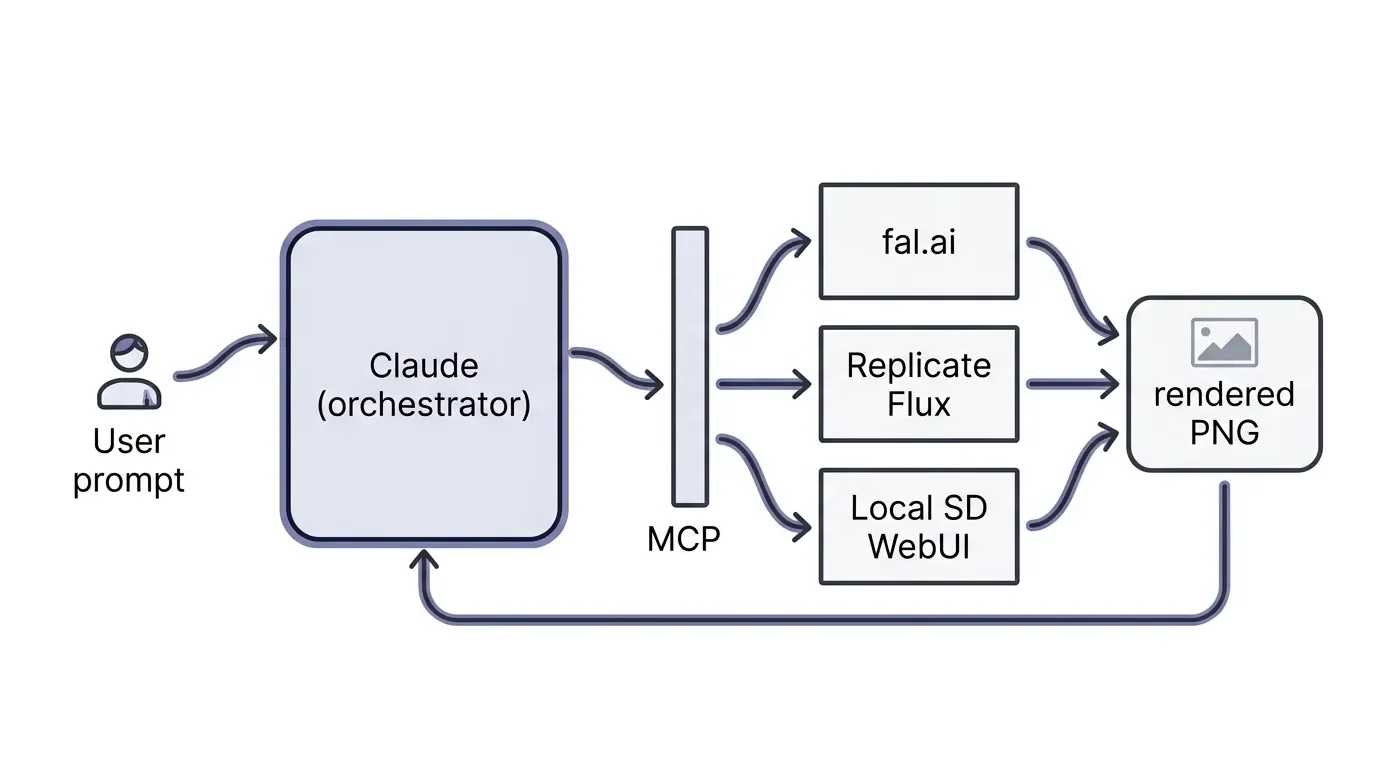
MCP is Anthropic's open standard that lets Claude (desktop or CLI) connect directly to external APIs and your local dev environment. The clever bit: Claude becomes the orchestrator. You ask it for an image, it interprets the request, tunes the prompt, calls an external image server through MCP, and renders the resulting PNG or JPEG right inside your chat.
So you're not really not getting images from Claude. You're getting images through Claude, with Anthropic's reasoning sitting in front of whatever raster model you prefer. Subtle distinction, big workflow difference.
MCP servers worth knowing:
fal.aiMCP – Connects Claude to fal's catalog of over 1,000 specialized image, video, and 3D models, including tuned FLUX.1 setups. Probably the broadest catalogue.
Higgsfield MCP – Marketing-focused: background replacement, social asset generation, and consistent character training across shots.
Replicate Flux MCP – FLUX.1 Schnell and custom diffusion checkpoints, executed via a secure local environment.
Local SD WebUI bridges – Hook Claude Code or Cowork into a local Stable Diffusion install (WebUI Forge works well). Effectively zero marginal cost per image once your hardware is set up – realistically, a GPU like the MSI GeForce RTX 5090 32G Gaming Trio OC and a fast external drive like the Samsung T9 2TB for the checkpoints, since FLUX and SDXL files add up quickly.
I walked through the local SD WebUI bridge setup as part of researching this post, and the documented workflow is surprisingly straightforward. The first 30 minutes are configuration pain. After that, you're running unlimited generations through Claude's reasoning layer.
The Two-Model Optimization Pipeline
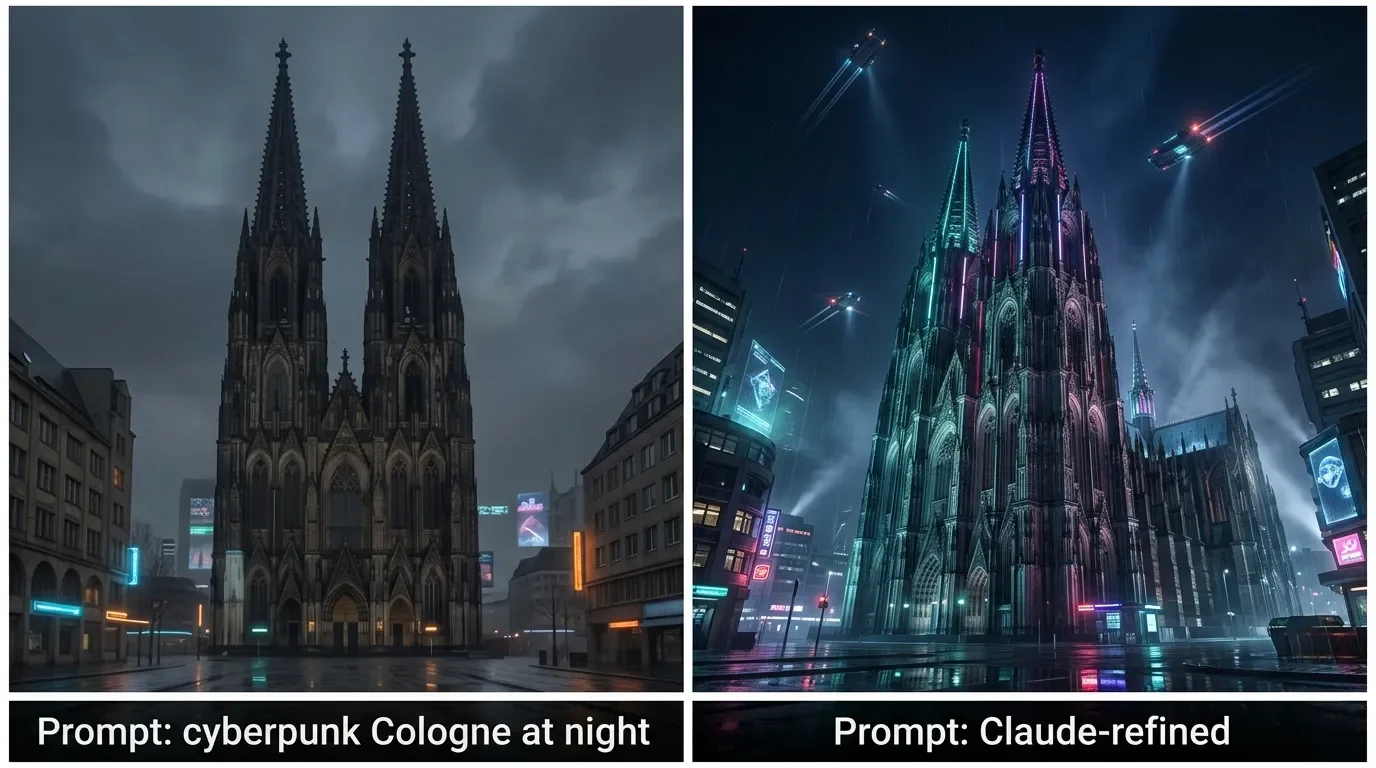
The second option is simpler: use Claude as a prompt copilot, then send the polished prompt elsewhere. Text-to-image models are notoriously picky about phrasing, and Claude is genuinely great at generating variants, style guides, and negative prompts before you paste them into Midjourney or DALL-E.
Different engines want different inputs:
Midjourney likes dense, comma-separated keywords with stylistic parameter flags.
DALL-E 3 prefers narrative prose, including explicit instructions about avoiding text in the image and reducing clutter.
I'll be honest – this two-step flow is annoying. You're tab-switching. But the quality jump from first-try prompt I dumped into Midjourney to Claude-refined prompt is large enough that I keep doing it. But if you just want to create a quick image, you’re definitely better off with Gemini or ChatGPT.
Where Claude's Vision Actually Shines
This is the part that gets undersold, in my opinion. Claude's visual input is, in my testing, the best of the frontier models for document and screenshot analysis. Other models treat image input as a side task. Claude processes visual data through the same logical network as text, which has real consequences:
Contextual Synthesis
It doesn't just label bar chart. It reads the axis labels, picks out trends, flags anomalies, and ties the figures back to whatever methodology the surrounding document describes. I've used this for reading PDFs of dense tutorials and even old psychology papers from my HHU days.
Unified Visual Parsing
Throw it a screenshot of your terminal full of console errors, a multi-column finance table, or a half-rendered webpage, and Claude reads the whole layout as one canvas. This is why computer-use agents and dev tooling lean on Claude for visual debugging.
Opus 4.7 also pushed the max input resolution to 2,576 pixels on the long edge – roughly 3.75 megapixels, more than three times what earlier Claude models supported. Sounds technical, but in practice it means I can finally feed it a screenshot of a dense Squarespace 7.1 editor view without losing detail in the compression. Small thing, real quality-of-life upgrade.
There's also a quieter but important shift under the hood. In February 2025, Anthropic launched manual Extended Thinking with Claude 3.7 Sonnet. You allocated a token budget and the model would think out loud before answering. Useful, but fiddly.
With 4.6 and Opus 4.7, that became Adaptive Reasoning – instead of pre-allocating a token budget by hand, you set an effort level and the model decides for itself how much to think, when to call a tool through MCP, evaluate what came back, think again, and continue. For multi-step visual workflows, this is the right paradigm. You're no longer micromanaging the cognitive budget.
If you want to go deeper on how this kind of agentic, tool-using AI actually gets built and deployed in production, Chip Huyen's AI Engineering is the most practical end-to-end primer I've found on the topic.
Claude vs. ChatGPT vs. Gemini

For anyone trying to pick the right tool, here's how the visual and cognitive picture currently looks across the three big model families:
| Feature | Anthropic Claude (Opus 4.7 / Sonnet 4.6) | OpenAI ChatGPT (GPT-5.5) | Google Gemini (3.1 Pro / 3.5 Flash) |
|---|---|---|---|
| Native Raster Output | None (external API / MCP) | Built-in ChatGPT Images 2.0 | Built-in Imagen 4; native image gen via Gemini 3 Image models |
| Vector & Interactive | Native SVG; HTML, CSS, React via Artifacts | Basic code blocks; no interactive canvas | Static mockups; Google Stitch canvas |
| Reasoning Model | Adaptive Reasoning (standard, high, xhigh, max) | Thinking mode (Instant / Thinking / Pro) | Deep Think mode (3.1 Pro); fast agentic reasoning (3.5 Flash) |
| Context Window | 1,000,000 tokens (Pro / Max / Team) | 400,000 tokens (Codex / ChatGPT) | 1,000,000 tokens (3.1 Pro and 3.5 Flash) |
| SWE-bench Verified | 87.6% (Opus 4.7) | ~86% (GPT-5.5, third-party leaderboard) | ~76% (3.1 Pro); 3.5 Flash leads on agentic coding (no official Verified score yet) |
| GPQA Diamond | 91.3% (Opus 4.6) | N/A (not published for GPT-5.5) | 94.3% (Gemini 3.1 Pro) |
| ARC-AGI-2 | 75.8% (Opus 4.7) | 85.0% (GPT-5.5) | 77.1% (Gemini 3.1 Pro) |
| Vision Input | 2576px, 600 images via API | 1568px, 20-image cap | High-res, landmark and object detection |
Wrapping It Up
Can Claude generate images? is the wrong question. The honest version is what kind of visual work are you actually trying to do? For a quick Instagram thumbnail or a photoreal hero shot, ChatGPT and Gemini will get you there faster – use them. But for technical documentation, UI prototypes, interactive components, or anything where visual structure matters more than visual aesthetics, Claude's bet on code, reasoning, and MCP is the more grown-up move. And when you do need a raster output, MCP closes the gap cleanly enough that calling it a limitation feels almost outdated.
In my workflow it nets out simply: Gemini when I want a quick image, Claude for everything else – which turns out to be most things.
So I'm curious where you've landed: are you still bouncing between Claude and ChatGPT for image work, or has MCP (or Claude Design) actually replaced one of your other tools? Drop your setup in the comments below – especially if you've come across an MCP server I should have included.
And if you'd rather not hunt these workflows down yourself, my tech newsletter is where I send the stuff that didn't quite fit into a full post: one short email a week with the AI tools and workflow tweaks I actually kept reaching for after testing. No filler.



FAQ
-
Yes – this is actually where Claude shines, even though it can't output images. You can drop in screenshots, PDFs, diagrams, or photos and Claude will read them as part of the same reasoning pass it uses for text. In my testing, it's noticeably better than the competition at parsing dense layouts like terminal output, multi-column tables, or annotated charts.
-
Yes, in two different ways. You can use Claude as a prompt copilot to refine wording, style, and negative prompts before pasting them into Midjourney or DALL-E, which usually beats first-try prompting in either tool. Or you can wire those image generators into Claude directly via MCP, so the raster output appears right in your Claude conversation without leaving the chat.
-
A local Stable Diffusion install bridged into Claude through MCP. Once your hardware is set up, the marginal cost per image is effectively zero, with Claude handling prompt tuning and orchestration on top. The downside is the initial configuration time and the need for a capable GPU; if you don't already have one, paid MCP services like fal.ai or Replicate are the lower-friction starting point.
-
No – Claude Design is gated to Pro and above as a Research Preview, and on Pro the rate limits bite quickly once you're doing real design work. The Free plan still gets you chat, file analysis, and Sonnet 4.6, but the design canvas, codebase-aware design system, and Claude Code handoff are paid features. For daily use, Max 5x is the realistic floor.
-
Nothing official suggests it's coming, and Anthropic's hiring and partnership moves point in the opposite direction. The Karpathy hire is about pretraining and reasoning depth, not diffusion, and the SandboxAQ partnership leans into scientific computation rather than creative art. MCP is the official answer to "but what if I want a JPEG" – and given how cleanly it works, that's probably the long-term plan.
-
Generally yes, if you stick to reputable servers and read what each one is allowed to do before you grant access. Every MCP server declares the tools and resources it exposes, and you control which Claude client connects to it. The real risk isn't MCP itself – it's installing servers from unknown sources that could touch your filesystem or call out to APIs you don't want. Treat them like any other developer tool you're about to give shell-adjacent access.