
Apple AirTag for Android: Does It Work + Best Alternatives (2026)

The Short Answer
No. Not in any way that actually counts. You can't set up an AirTag, you can't register one to your account, and you can't see where it is from an Android phone, because every one of those steps runs through an Apple device and the Find My app. Android gets exactly two AirTag tricks: tap a lost tag with NFC to read the owner's contact info, and get a warning when a stranger's AirTag is tagging along with you.
So if you carry an Android phone and you're shopping for a tracker, save your money. Buy a Samsung Galaxy SmartTag2 if you're on a Galaxy, or a Chipolo POP on Google's Find My Device network for any other Android phone. That's the recommendation. The rest of this post is the why, because the "why" is the part most articles skip right over.
Full disclosure before we go further: among friends and family I'm the designated tech person, and "will this work with my Samsung?" is a question I get asked constantly. So I've watched that disappointment land in real time more than once. I also live with a small drawer of these trackers on my own keys, bag, and travel gear, so a lot of what follows is hands-on, not spec-sheet.
What Is an AirTag, and How Does It Actually Work?

I like to think of an AirTag as a tiny radio beacon, not a GPS dot on a map. There's no GPS chip and no SIM card inside. It just broadcasts a rotating, encrypted Bluetooth signal, and any nearby Apple device quietly picks that signal up, tags it with its own location, encrypts the whole thing, and ships it off to iCloud. You then open Find My and see the result. The clever bit is the scale. Apple says that finding network is now made up of over a billion devices, which is why a lost AirTag in a busy city usually pings back fast, and why one left in a quiet rural area can go dark for hours.
For the close-range hunt, the AirTag adds Apple's Ultra Wideband chip, which powers Precision Finding – the on-screen arrow that literally points you to your keys. That only works on an iPhone 11 or newer (Apple's tech specs), and the latest model's extended range needs an iPhone 15 or later. The third piece is NFC, the same tech behind tap-to-pay. Tap a lost AirTag that's in Lost Mode and a web page pops up with the owner's contact details. And here's the kicker: that NFC tap is the one AirTag feature that works the same on Android as it does on an iPhone.
The new second-generation AirTag, announced in January 2026, keeps the same coin shape and $29 price, but adds a second-gen Ultra Wideband chip, a speaker that's up to 50% louder, and Precision Finding range up to 1.5x farther. None of which changes the Android story one bit – it still needs iOS 26.2.1 or later just to set up.
Can You Use an AirTag with Android?
The AirTag hardware isn't locked to Apple in some physical sense. The network is. Setup, naming, the map, Precision Finding – all of it lives in the Find My app, and Find My only runs on Apple gear. An Android phone has no door into that system.

What you actually can do from Android is short and not very useful for tracking your own stuff:
Tap a lost AirTag with NFC to read the owner's Lost Mode contact info.
Get alerted when an unknown AirTag is moving with you (more on that below).
That's the whole list. You cannot pair one, you cannot see it on a map, you cannot make it play a sound on demand from Android. I've had people ask me, genuinely convinced they could buy an AirTag for their kid's Galaxy. I have to gently explain that they'd be buying a very expensive Bluetooth paperweight.
Detecting a Stranger's AirTag on Android
Apple does offer an Android app called Tracker Detect that scans for Find My trackers traveling with you. Sounds reassuring, until you learn it only scans when you open it and tap the button. No background scanning, no automatic heads-up. In my own testing it's been more miss than hit – I've had a tag sitting right next to my phone and had to run the scan two or three times before it showed up. As a safety tool, a manual-only scanner is a bit like a smoke detector you have to remember to press every few minutes.
The better news is that you probably don't need it. Android 6 and up now has built-in unknown-tracker alerts that fire automatically when a tag you don't own is following you, no separate app required. And if you want one app that watches for AirTags, Samsung SmartTags, and Google tags all at once with proper background scanning, the open-source AirGuard app – built by the SEEMOO security lab at TU Darmstadt – is the one I'd point friends to.
What about Finding It on iCloud.com?
A lot of people assume there's a browser loophole: just log into iCloud.com on your Android, right? Nope. AirTags and Find My items simply don't appear on the iCloud.com web interface at all – only the Find My app on an iPhone, iPad, or Mac can locate them. Apple says this plainly, and the iCloud "Find Devices" guide lists iPhones, iPads, Macs, Apple Watch, AirPods, and Beats, but never items or AirTags. The web shows your devices, not your tags. It's a frustrating gap, but it is what it is.
The Best AirTag Alternatives for Android & Even iOS in 2026
| Tracker | Works on | Finding network | Range (listed) | Water | Price |
|---|---|---|---|---|---|
| Apple AirTag (2nd gen) | Apple only (needs iPhone/iPad) | Apple Find My (huge) | Bluetooth + UWB | IP67 | $29 / $99 four-pack |
| Samsung Galaxy SmartTag2 | Samsung Galaxy only (officially) | SmartThings / Samsung Find | ~120 m | IP67 | ~$22–30 |
| Tile Pro (2024) | iOS + Android | Tile's own network | 500 ft listed | IP68 | $34.99 |
| Chipolo POP | iOS + Android (pick one network) | Apple Find My or Google Find My Device | 300 ft | IP55 | ~$28 |
| Tracki GPS | iOS + Android | 4G LTE cellular (no crowd) | Worldwide | IP67 | Device + subscription |
One rule decides everything here: a tracker is only as good as the network it can reach. A tag built for Apple Find My is invisible to Android, and vice versa. Match the tag to your phone's network and you're golden. Get it wrong and you've bought a beeper with a one-year battery.
Samsung Galaxy SmartTag2

If you're on a Galaxy, the Samsung Galaxy SmartTag2 is the easy winner, and it's not close. Even Android Authority named the SmartTag2 the best Android tag overall. It taps Samsung's SmartThings Find network, adds UWB and AR-guided finding on recent Galaxy phones, and Samsung lists Bluetooth range up to around 120 m. At an MSRP of $29.99 and a street price closer to $22, it's a steal.
The one big asterisk: it's officially Samsung-only. Put it on a Pixel or a OnePlus and the network goes dead. There's a community app called uTag that unofficially opens it up to any Android by patching SmartThings, but I'd treat that as a fun weekend project, not a reason to buy. If Samsung breaks it next update, you're stuck.
Tile Life360 Pro

The Tile Pro – now sold as the Tile by Life360 Pro after Life360 bought the brand – is the one tag that genuinely doesn't care whether you're on iPhone or Android. It's loud at 110 dB, it's IP68 water-resistant, it has a replaceable year-long CR2032 battery, and it lists a 500 ft range. The 2024 model also added an SOS button and a double-press that rings your phone even on silent. About that range, though – it's a real point of disagreement. Android Police actually hit the full 500 ft in a clear line-of-sight test, while Tom's Guide saw far less in normal conditions. So: great in an open field, much shorter once walls and pockets get involved. Sounds about right for any Bluetooth gadget, honestly.
The real catch is still the network. Tile runs its own crowd network and pointedly does not use Google Find My Device, with no sign in 2026 that's about to change. Tile's bet is that Life360 ownership makes up for it: every phone running the Life360 app also scans for Tiles, which widens the net beyond Tile's own users. It's a clever angle, but that combined crowd is still a fraction of Google's or Apple's, so a Tile is less likely to phone home from somewhere quiet. Buy it for the genuine cross-platform convenience, not for finding power.
Chipolo POP

Chipolo makes my favorite budget pick, and it just got a lot simpler to buy. The old Spot-versus-Point split – one model for Apple, a different one for Google – is gone. The new Chipolo POP works with either network: you choose Apple Find My or Google's Find My Device (now Find Hub) when you set it up, and you can switch later. On Android, point it at Google's network and it rides the full crowd of Android phones. It's blisteringly loud at around 120 dB, it's splash- and dust-resistant (IP55), it has a replaceable CR2032 battery good for about a year, and it runs around $28. No UWB, so no precise arrow-guided finding, but for keys and bags the network coverage matters more than the last ten feet.
If you'd rather never fuss with a coin battery, the step-up Chipolo LOOP is the same cross-platform idea in a rechargeable USB-C body – louder (125 dB), longer range (120 m / 400 ft), and tougher (IP67) – for a bit more money.
Cube Shadow

If you want something for a wallet rather than a keyring, the Cube Shadow is genuinely thin and rechargeable, with a roughly 200 ft Bluetooth range. The honest catch: it relies on Cube's own small "crowd find" network, which is a fraction of Google's or Apple's. So out in the wild it's far less likely to phone home than a Chipolo POP. I'd only reach for it if slimness genuinely beats finding range for you – a wallet you mostly lose inside the house is the ideal use case.
Tracki GPS
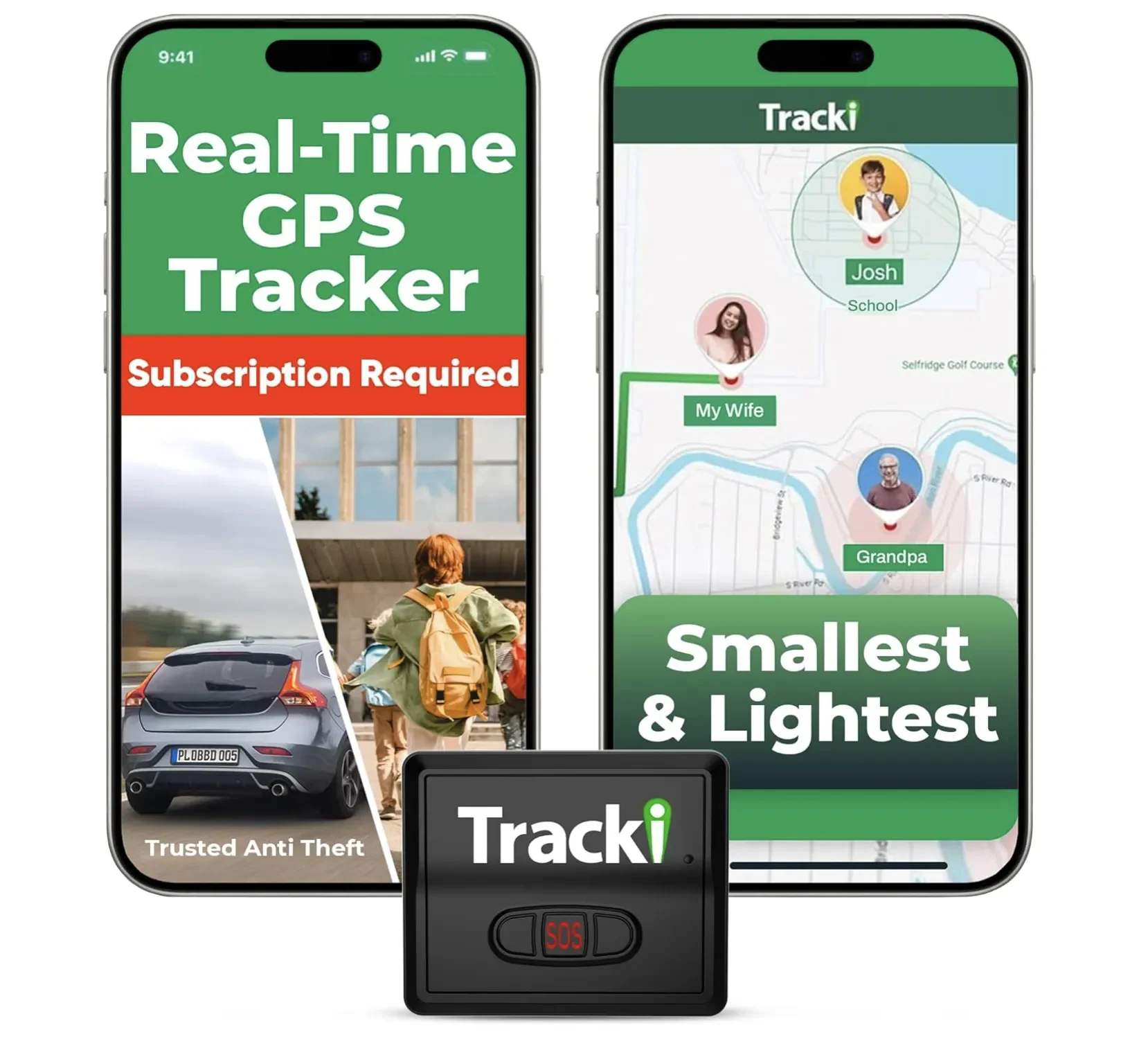
The Tracki is a different approach entirely. It's not a Bluetooth tag, it's a 4G LTE GPS tracker with worldwide coverage, real-time updates, SOS, and geofencing. For a car, a piece of luggage you're checking, or anything you need to follow live across a country, nothing on this list comes close. But it carries a mandatory subscription, so go in expecting an ongoing bill, not a one-time buy.
So Which One Should You Actually Buy?
Let me make this dead simple, the way I'd explain it to a friend:
You have a Samsung Galaxy – get the SmartTag2. Done. It's the best tag for you and it's cheap.
You have any other Android (Pixel, OnePlus, Motorola) – get the Chipolo POP on Google's Find My Device network. The network is what you're paying for.
You and your family bounce between iPhone and Android – the Tile Pro is the diplomatic choice, just know the network is smaller.
You need live, cross-country tracking (a car, checked luggage, a vehicle) – the Tracki, subscription and all.
You're an Android user eyeing an AirTag – don't. There's no version of this where it's the right call.
Are AirTags a Privacy Risk for Android Users?

Credit: Google
Well, this is a part I take seriously, and my old law-school instincts make me read the fine print here. The headline worry is unwanted tracking – someone slipping a tag into your bag or car. It's not hypothetical: Apple has faced a long-running stalking lawsuit (Hughes v. Apple), and while a judge denied class certification in March 2026 and sent plaintiffs to file individually, Apple was still facing at least 22 individual suits by May 2026.
The protections have gotten better on both sides, though. Apple shortened its unwanted-tracking alert window and made separated tags chirp, Android has its built-in alerts, and in 2024 Apple and Google jointly shipped a cross-platform unwanted-tracking standard so an iPhone tag can warn an Android user and vice versa. It's a real improvement. It's also not perfect – the alerts can be vague or slow. If you ever get one, take it seriously, and lean on AirGuard for a proper background scan rather than Apple's manual-only Tracker Detect.
My Take after Living with These Trackers
I bounce between an iPhone for work and other devices (mainly Samsung) at home, and I've had AirTags, a couple of Chipolos, and Samsung tags in rotation. The pattern is consistent: the tag wins or loses entirely on its network. My AirTags update almost spookily fast in a city, because there's an Apple device every few feet. The moment you take that same hardware logic to Android, the magic just evaporates – not because the tag is bad, but because Android phones aren't out there feeding the Apple network.
That's also why I push back hard when someone wants to "make it work" with a third-party app or a browser trick. I've tried the workarounds. They're fragile, and a tracker you can't fully trust is worse than no tracker at all, because it lulls you into thinking your stuff is covered when it isn't. Years of these conversations have taught me that people don't want a hobby project. They want to find their keys. For an Android user, that means buying the tag built for their network and never thinking about it again.
My Verdict
An AirTag and an Android phone are a bad marriage. You can't set it up, you can't track it, and the only things Android can do – NFC-tap a lost one and get safety alerts – have nothing to do with finding your own stuff. So don't fight it.
If you're on a Samsung Galaxy, buy the SmartTag2 and move on. On any other Android, the Chipolo POP gets you onto Google's full finding network for under $30. Match the tag to your phone, skip the AirTag, and you'll actually find your keys on a Tuesday morning – which, at the end of the day, is the entire point.
Found a tracker that actually holds up on your Android phone, or got burned by one that looked great on paper? Tell me what's on your keychain and how it's worked out in the comments below – I read them, and the weird edge cases are usually the most useful ones.
If you want more no-nonsense tech breakdowns like this one, join my tech newsletter: I send a plain-English buy-or-skip verdict on gadgets before you spend a paycheck finding out the hard way.




FAQ
-
Yes, but only through the iPad. You'd set up and track the AirTag on the iPad (or any Apple device), while your Android phone stays out of the loop completely. It only helps if you actually carry that Apple device when you need to find the tag, so it's a clumsy fix at best.
-
No. Apple has never made an AirTag for Android, and any video claiming "AirTags for Android are finally here" is really talking about Google Find My Device tags, not an Apple product. As covered above, tags like the Chipolo POP or a Pebblebee are the genuine Android equivalent.
-
Most don't. The SmartTag2, Tile Pro, and Chipolo all handle core finding with no subscription – you buy the tag and you're done. The one big exception is the Tracki, which is a cellular GPS device and needs an active data plan to work at all.
-
Officially, no. It's tied to Samsung Galaxy devices and the SmartThings network, so on a Pixel the finding network is basically dead. There's an unofficial app called uTag that patches it onto other Android phones, but I wouldn't build my setup around a workaround Samsung could break with one update.
-
Yes, and that's exactly why the detection tools matter. An AirTag behaves the same no matter who hid it, so an Android user can absolutely be followed by one. The saving grace is that Android 6 and up has built-in unknown-tracker alerts, and the open-source AirGuard app scans in the background rather than waiting for you to remember.
-
Not in the slightest. The 2026 model adds a louder speaker and longer Precision Finding range, but every one of those upgrades lives inside Apple's ecosystem. For an Android user it's the same story as the first AirTag: you still can't set it up or track it.
MOST POPULAR
LATEST ARTICLES


I sell Apple Pencils at a tech store every week, and this apple pencil comparison covers the exact questions customers ask before buying one.